diagram.mmd — flowchart
Offline First App Flow flowchart diagram

Offline-first is an architectural approach for web applications where the app is designed to work fully from a local cache by default, using the network only as a mechanism to synchronize state — rather than treating network availability as a prerequisite.
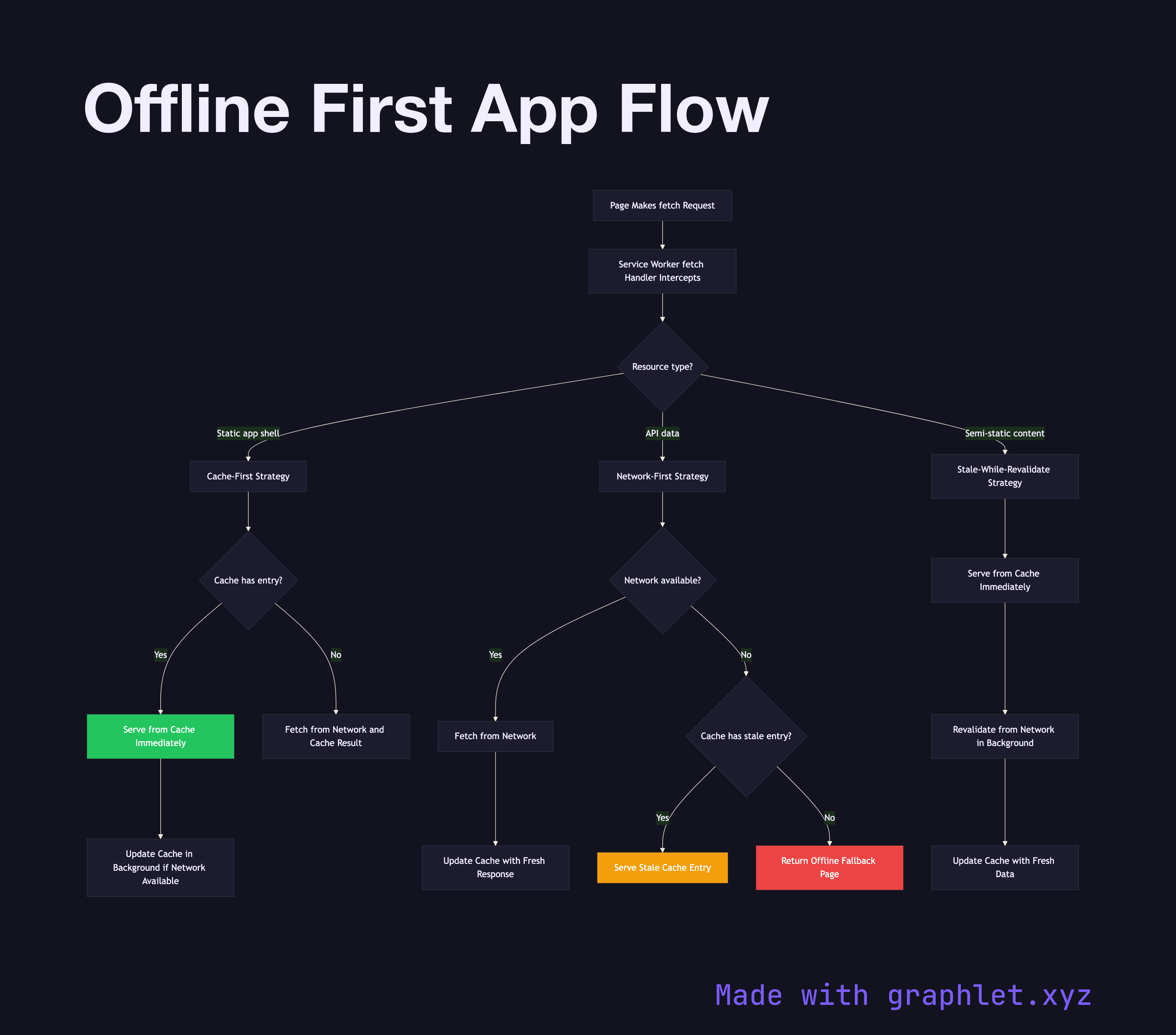
The offline-first pattern is implemented primarily through a service worker acting as a network proxy. Every fetch event passes through the service worker's fetch handler, which implements a cache strategy for each type of request. The correct strategy depends on the nature of the resource.

For static assets (the app shell: HTML, CSS, compiled JS bundles), the cache-first strategy is ideal — serve from cache immediately and only update the cache in the background when a network response is available. This gives instant load times on repeat visits. For API data where freshness matters, a network-first strategy is more appropriate: try the network, fall back to cache if the network is unavailable. For resources where stale data is acceptable but you want to keep the cache fresh, stale-while-revalidate returns the cached version instantly while updating the cache in the background.

Background sync via the Background Sync API allows the app to defer network requests made while offline and replay them when connectivity is restored. For example, a form submission made offline is queued as a sync event; when the browser regains connectivity, the service worker fires the sync event and sends the queued request. This makes offline-first viable for write operations, not just reads.

The full flow requires coordination between the Service Worker Lifecycle (to ensure the service worker is active before requests are intercepted), Browser Caching Strategy (for HTTP cache interactions), and application-level state management to surface connectivity status to the user. See Web Performance Optimization for where offline-first fits in a broader performance strategy.

Free online editor
Edit this diagram in Graphlet
Fork, modify, and export to SVG or PNG. No sign-up required.
Open in Graphlet →

Frequently asked questions

An offline-first app is designed to work fully from a local cache by default, treating the network as an optional synchronisation channel rather than a hard dependency. It loads instantly from cache, serves all static assets and recent data without a network connection, and syncs changes when connectivity is restored.
A service worker intercepts every `fetch` event and applies a per-resource strategy. Cache-first serves static assets from cache immediately and updates the cache in the background. Network-first tries the network and falls back to cache on failure, keeping API data as fresh as possible. Stale-while-revalidate returns the cached version instantly and refreshes the cache in the background — balancing speed with freshness.
Use cache-first for the app shell (HTML, CSS, compiled JS bundles) — assets that change only at deploy time and need instant load on repeat visits. Use network-first for API responses where data freshness is important and a stale result would mislead the user. Use stale-while-revalidate for feeds, non-critical UI data, and assets where slight staleness is acceptable.
Not pre-caching the app shell during the `install` event is the most critical mistake — the app cannot load offline if its core assets are missing from the cache. Others include forgetting to clean up old cache versions in the `activate` event (causing stale assets to persist after updates), not implementing background sync for write operations made offline, and failing to surface connectivity status to the user so they understand why data may be stale.
mermaid
flowchart TD A[Page Makes fetch Request] --> B[Service Worker fetch Handler Intercepts] B --> C{Resource type?} C -- Static app shell --> D[Cache-First Strategy] C -- API data --> E[Network-First Strategy] C -- Semi-static content --> F[Stale-While-Revalidate Strategy] D --> G{Cache has entry?} G -- Yes --> H[Serve from Cache Immediately] H --> I[Update Cache in Background if Network Available] G -- No --> J[Fetch from Network and Cache Result] E --> K{Network available?} K -- Yes --> L[Fetch from Network] L --> M[Update Cache with Fresh Response] K -- No --> N{Cache has stale entry?} N -- Yes --> O[Serve Stale Cache Entry] N -- No --> P[Return Offline Fallback Page] F --> Q[Serve from Cache Immediately] Q --> R[Revalidate from Network in Background] R --> S[Update Cache with Fresh Data] style H fill:#22c55e,color:#fff style O fill:#f59e0b,color:#fff style P fill:#ef4444,color:#fff
Copied to clipboard