Deep Link Routing
Deep link routing describes the process by which a URL — received from a push notification, email, social media post, or web browser — opens a mobile app and navigates the user directly to the correct in-app screen rather than the app's home screen.
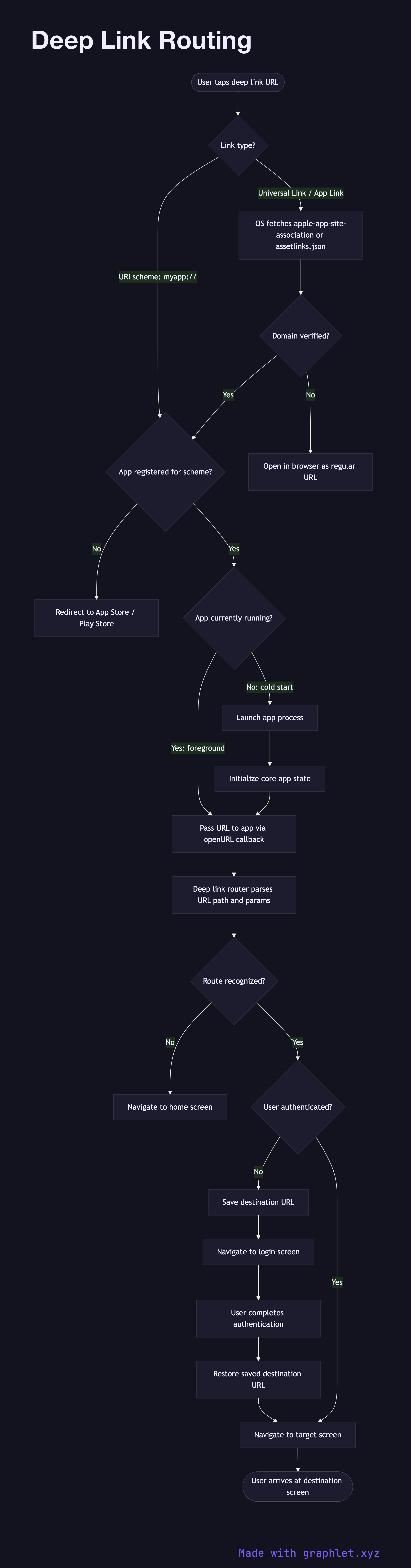
Deep link routing describes the process by which a URL — received from a push notification, email, social media post, or web browser — opens a mobile app and navigates the user directly to the correct in-app screen rather than the app's home screen.
There are two primary mechanisms. URI scheme deep links (e.g., myapp://products/42) are custom URL schemes registered in the app's manifest. Any app can claim any custom scheme, so they carry no security guarantee — a malicious app could register the same scheme and intercept links. Universal links (iOS) and App Links (Android) address this by using standard HTTPS URLs (e.g., https://myapp.com/products/42). The OS verifies ownership by fetching a signed JSON file (apple-app-site-association or assetlinks.json) from the domain before granting the app authority to handle those URLs.
When the OS receives a deep link, it first checks whether the app is installed. If not, the fallback is typically the App Store or Play Store listing, or a web page at the same URL. If the app is installed, the OS passes the URL to the app via an AppDelegate or intent handler callback.
Inside the app, a router parses the URL path and query parameters and maps them to a specific screen or action. The router must also handle the cold start case, where the app isn't running — it needs to initialize essential state before attempting navigation. If the deep link requires authentication and no session exists, the user is redirected to the login screen, with the original destination preserved so navigation can resume after sign-in.
For notification-triggered deep links specifically, see Push Notification Flow. For full cold start context, see App Launch Lifecycle.