diagram.mmd — flowchart
Reverse Proxy Request Flow flowchart diagram

A reverse proxy is a server-side intermediary that accepts incoming client requests and forwards them to one or more backend servers, providing TLS termination, request routing, load balancing, caching, and security filtering from a single entry point.
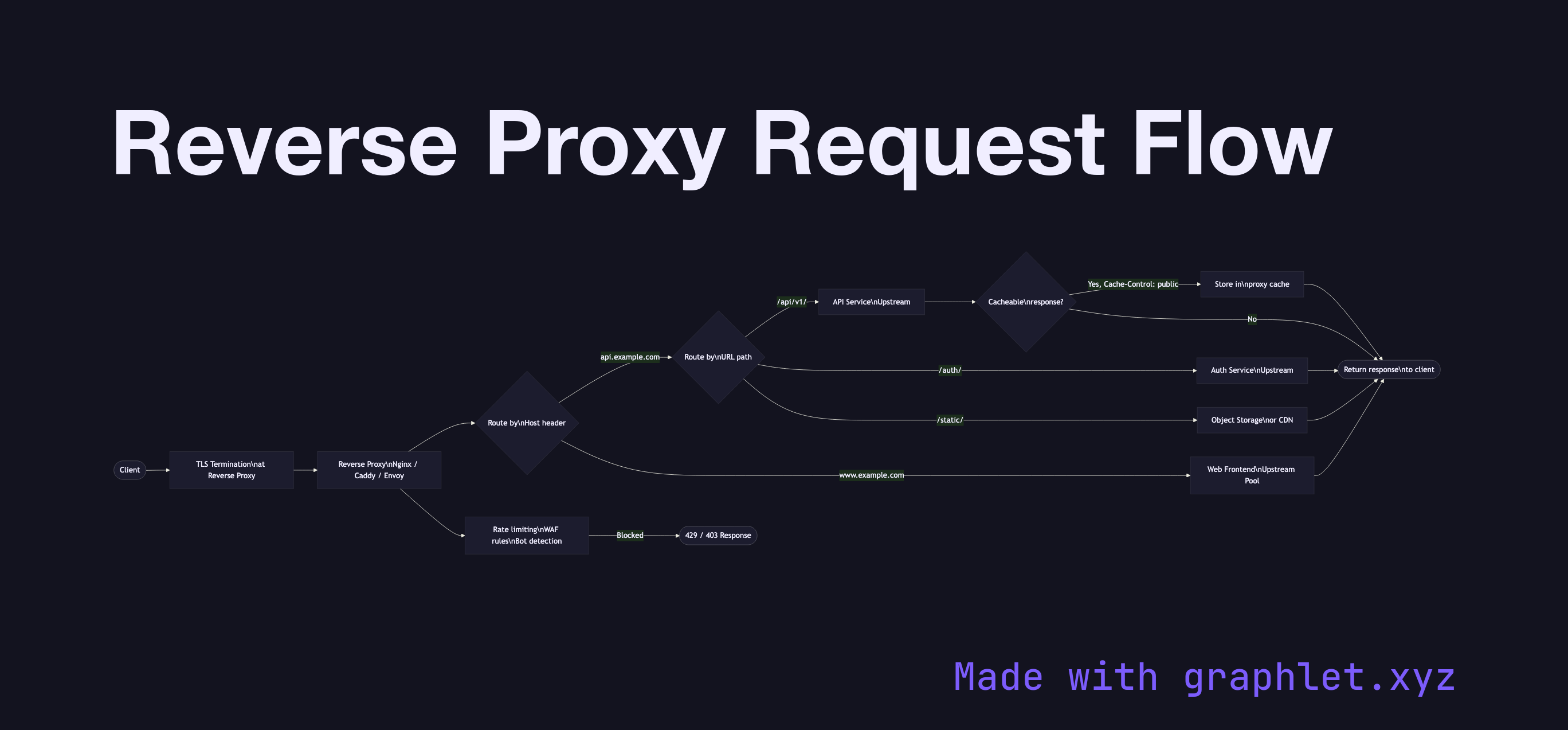
Unlike a forward proxy that serves clients, a reverse proxy serves the backend infrastructure. From the client's perspective, it's talking directly to the destination server — the reverse proxy is invisible except for the IP address it exposes.

TLS Termination: The reverse proxy handles TLS on behalf of all backends. Clients establish TLS with the proxy; backends receive plain HTTP over a trusted internal network (or re-encrypted with a separate TLS session). This centralizes certificate management (one wildcard or multi-SAN cert), offloads crypto from application servers, and enables the proxy to inspect HTTP headers for routing.

Virtual Host Routing: A single reverse proxy can serve multiple applications by routing based on the Host header. A request for api.example.com goes to the API cluster; www.example.com goes to the web frontend. This is standard configuration in Nginx, Caddy, and cloud load balancers.

Path-Based Routing: Within a single hostname, requests can be routed by URL path prefix: /api/ routes to the API service, /static/ routes to an object store or CDN, /auth/ routes to an authentication service. This is the foundation of API gateway patterns (see API Gateway Request Flow).

Response Caching: Reverse proxies can cache backend responses (for GET requests with appropriate Cache-Control headers), serving subsequent identical requests from cache without hitting the backend — similar to a CDN at the edge of your own infrastructure.

Security Layer: Rate limiting, WAF (Web Application Firewall) rules, bot detection, and DDoS mitigation are commonly implemented at the reverse proxy layer.

Free online editor
Edit this diagram in Graphlet
Fork, modify, and export to SVG or PNG. No sign-up required.
Open in Graphlet →

Frequently asked questions

A reverse proxy is a server-side intermediary that accepts inbound client requests and forwards them to one or more backend servers. From the client's perspective, it is communicating directly with the destination — the reverse proxy is invisible except for the IP it exposes. It provides TLS termination, routing, caching, and security filtering from a single entry point.
The reverse proxy establishes TLS with clients using its own certificates, decrypts the request, and forwards plain HTTP to backends over a trusted internal network (or re-encrypts with a separate TLS session). This centralises certificate management, offloads cryptographic computation from application servers, and allows the proxy to inspect HTTP headers for routing and filtering.
The reverse proxy inspects the `Host` header and URL path of each decrypted request. Requests to `api.example.com` can be routed to the API service cluster, while `www.example.com/static/` routes to a CDN or object store. This pattern is the foundation of API gateway routing — see [API Gateway Request Flow](/diagrams/backend/api-gateway-request-flow).
Not forwarding the original client IP via `X-Forwarded-For` or `X-Real-IP` headers (breaking IP-based logging and rate limiting), misconfiguring TLS between the proxy and backends (trusting self-signed certs carelessly), and failing to handle `Host` header rewriting correctly when backends expect specific hostnames are the most common issues.
A reverse proxy routes requests to backends and can serve a single backend (for TLS termination, caching, or WAF). A load balancer's defining feature is distributing traffic across multiple backends for availability and scalability. In practice, production reverse proxies (Nginx, Envoy, Caddy) implement load balancing as a built-in feature, so the distinction is more conceptual than technical.
mermaid
flowchart LR Client([Client]) --> TLS[TLS Termination\nat Reverse Proxy] TLS --> RProxy[Reverse Proxy\nNginx / Caddy / Envoy] RProxy --> HostRoute{Route by\nHost header} HostRoute -->|api.example.com| PathRoute{Route by\nURL path} HostRoute -->|www.example.com| WebUpstream[Web Frontend\nUpstream Pool] PathRoute -->|/api/v1/| APIService[API Service\nUpstream] PathRoute -->|/auth/| AuthService[Auth Service\nUpstream] PathRoute -->|/static/| StaticStore[Object Storage\nor CDN] APIService --> CacheCheck{Cacheable\nresponse?} CacheCheck -->|Yes, Cache-Control: public| CacheStore[Store in\nproxy cache] CacheStore --> Resp([Return response\nto client]) CacheCheck -->|No| Resp WebUpstream --> Resp AuthService --> Resp StaticStore --> Resp RProxy --> Security[Rate limiting\nWAF rules\nBot detection] Security -->|Blocked| Block([429 / 403 Response])
Copied to clipboard