diagram.mmd — flowchart
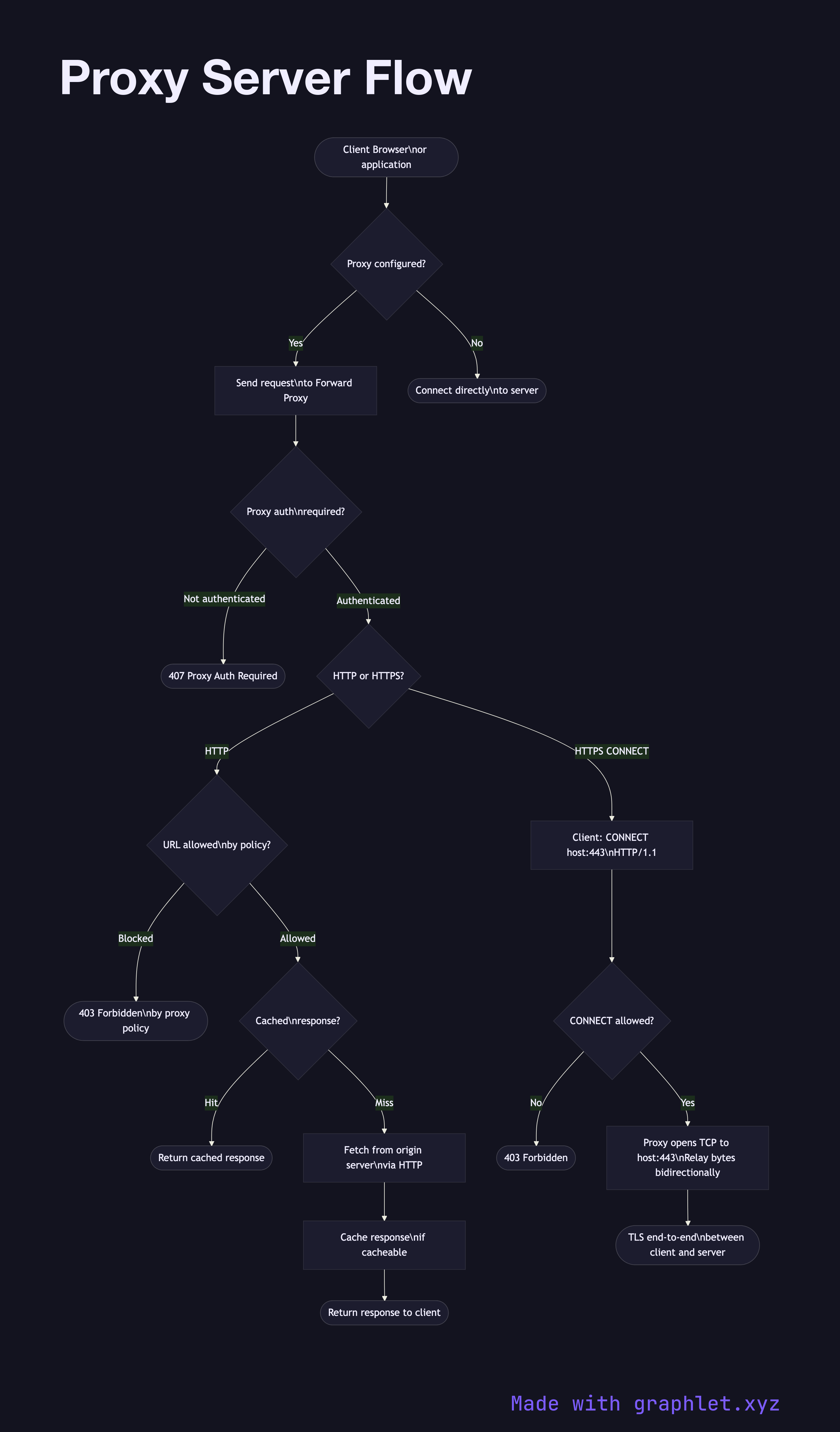
Proxy Server Flow flowchart diagram

A forward proxy server is an intermediary that sits between client devices and the internet, forwarding outbound requests on behalf of clients, enabling centralized access control, traffic inspection, caching, and anonymization.
The key distinction: a forward proxy acts on behalf of clients (hiding client identities from servers), while a reverse proxy acts on behalf of servers (hiding server details from clients). See Reverse Proxy Request Flow for the contrast.

Explicit Proxy Configuration: Clients are configured (manually or via WPAD/PAC files) to send all HTTP requests to the proxy instead of directly to the destination. The proxy reads the Host header (HTTP) or CONNECT method (HTTPS) to determine the actual destination.

HTTP Proxying: For plain HTTP, the client sends the full URL (GET http://example.com/path HTTP/1.1) rather than just the path. The proxy fetches the resource and can cache it, transforming or filtering responses as configured.

HTTPS CONNECT Tunneling: For HTTPS, the proxy cannot decrypt the traffic (it doesn't have the server's private key). The client sends CONNECT example.com:443 HTTP/1.1 to establish a TCP tunnel through the proxy. The proxy opens a TCP connection to the target and relays bytes in both directions. TLS is negotiated end-to-end through this tunnel.

Access Control: Organizations use forward proxies to enforce URL filtering policies — blocking categories of sites, logging traffic for compliance, or enforcing authentication before internet access.

Caching: Forward proxies can cache HTTP responses, reducing bandwidth usage for commonly accessed resources. This is less valuable today with widespread HTTPS (proxies can't cache encrypted responses without certificate interception).

Free online editor
Edit this diagram in Graphlet
Fork, modify, and export to SVG or PNG. No sign-up required.
Open in Graphlet →

Frequently asked questions

A forward proxy is an intermediary that sits between client devices and the internet, forwarding outbound requests on behalf of clients. Clients are configured to send requests to the proxy, which fetches the resource and returns it. The destination server sees the proxy's IP, not the client's — providing anonymization and enabling centralized access control.
For HTTPS, the client cannot send the full URL to the proxy (the traffic is encrypted). Instead, it sends a `CONNECT example.com:443 HTTP/1.1` request, asking the proxy to establish a raw TCP tunnel to the target. The proxy opens a TCP connection to the destination and relays bytes in both directions. TLS is negotiated end-to-end through this tunnel, so the proxy cannot inspect the encrypted content.
Use a forward proxy when you need centralized outbound traffic control for a network: URL filtering and category blocking, compliance logging of internet access, bandwidth reduction via HTTP response caching, or providing internet access to internal hosts that should not have direct public IP routing.
A forward proxy acts on behalf of clients — it forwards client requests outward to the internet and hides client identities from servers. A reverse proxy acts on behalf of servers — it accepts inbound client requests and forwards them to backend servers, hiding server topology. From the client's perspective, a reverse proxy looks like the destination server itself.
mermaid
flowchart TD Client([Client Browser\nor application]) --> Config{Proxy configured?} Config -->|Yes| ProxyReq[Send request\nto Forward Proxy] Config -->|No| Direct([Connect directly\nto server]) ProxyReq --> AuthCheck{Proxy auth\nrequired?} AuthCheck -->|Not authenticated| AuthDeny([407 Proxy Auth Required]) AuthCheck -->|Authenticated| Protocol{HTTP or HTTPS?} Protocol -->|HTTP| AccessCheck{URL allowed\nby policy?} AccessCheck -->|Blocked| Deny([403 Forbidden\nby proxy policy]) AccessCheck -->|Allowed| CacheCheck{Cached\nresponse?} CacheCheck -->|Hit| CacheResp([Return cached response]) CacheCheck -->|Miss| FetchHTTP[Fetch from origin server\nvia HTTP] FetchHTTP --> StoreCache[Cache response\nif cacheable] StoreCache --> ReturnHTTP([Return response to client]) Protocol -->|HTTPS CONNECT| ConnectReq[Client: CONNECT host:443\nHTTP/1.1] ConnectReq --> TunnelCheck{CONNECT allowed?} TunnelCheck -->|No| TunnelDeny([403 Forbidden]) TunnelCheck -->|Yes| Tunnel[Proxy opens TCP to host:443\nRelay bytes bidirectionally] Tunnel --> TLSEnd([TLS end-to-end\nbetween client and server])
Copied to clipboard