Wallet Payment Flow
A digital wallet payment (Apple Pay, Google Pay, Samsung Pay) replaces the traditional card entry experience with a biometric-authenticated, tokenized transaction that is more secure and faster for the cardholder. The underlying card charge still traverses the same payment network, but the card number is never exposed to the merchant.
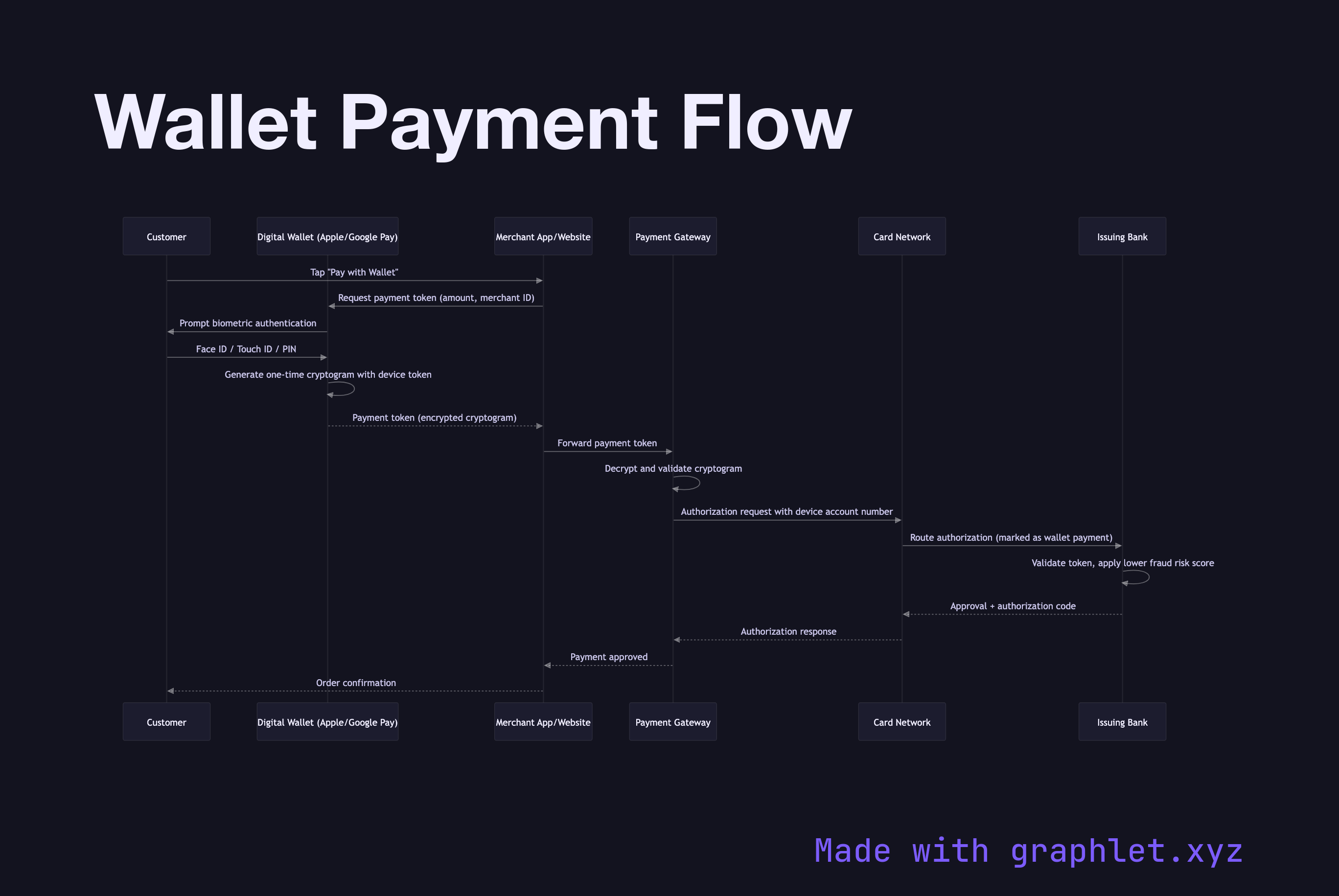
A digital wallet payment (Apple Pay, Google Pay, Samsung Pay) replaces the traditional card entry experience with a biometric-authenticated, tokenized transaction that is more secure and faster for the cardholder. The underlying card charge still traverses the same payment network, but the card number is never exposed to the merchant.
When a customer taps their phone or clicks "Pay with Apple Pay," the device presents the Wallet SDK with the transaction amount. The wallet app requests user authentication: Face ID, Touch ID, or PIN. If authentication succeeds, the wallet generates a payment token — a cryptogram specific to this transaction that includes a device account number (a network token replacing the real card PAN), transaction counter, and a cryptographic signature. This token cannot be replayed.
The payment token is returned to the merchant's web or app client, which forwards it to the merchant's payment gateway or backend. The gateway decrypts and validates the cryptogram using the card network's key (for Apple Pay, this is PKI-based; for Google Pay, it uses a symmetric encryption scheme). The decrypted payload contains the real card credentials needed to proceed with standard authorization.
From this point, the flow merges with the standard card authorization path: the gateway submits an authorization request to the acquirer and card network, and the issuing bank processes it. The issuer is aware the transaction used a device token (wallet payment) and applies lower fraud risk to it — improving approval rates compared to manually entered card numbers.
The merchant never sees the underlying card PAN. Even if the merchant's systems are breached, the stolen tokens are single-use and tied to specific transaction amounts, making them worthless to attackers. For the broader tokenization architecture see Payment Tokenization.