Security Audit Logging
Security audit logging is the systematic recording of security-relevant events — authentication attempts, authorization decisions, data access, and configuration changes — in a tamper-evident, queryable format for compliance, forensic investigation, and real-time threat detection.
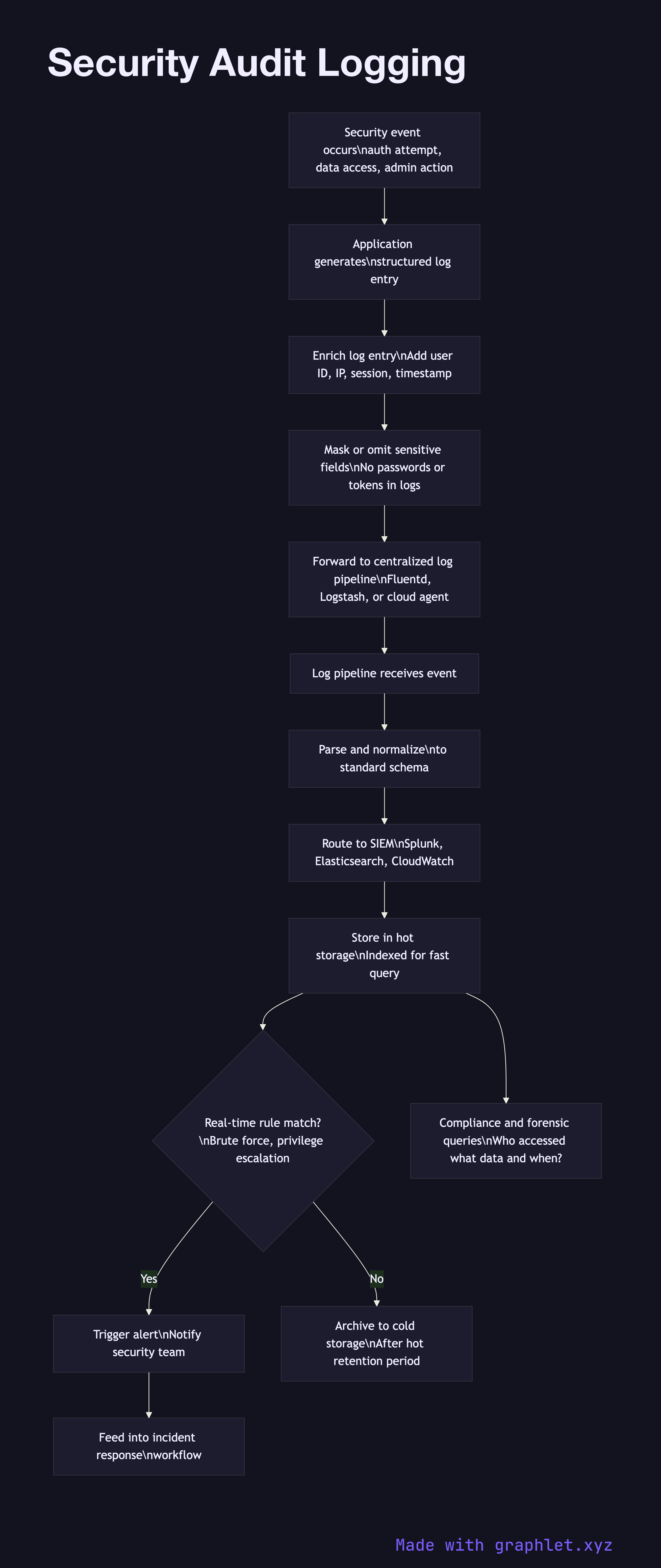
Security audit logging is the systematic recording of security-relevant events — authentication attempts, authorization decisions, data access, and configuration changes — in a tamper-evident, queryable format for compliance, forensic investigation, and real-time threat detection.
Audit logs differ from application logs in their purpose and requirements. Application logs track operational health (errors, latency). Audit logs track who did what to which resource, when, and from where — they answer forensic questions after a security incident and demonstrate compliance to auditors. The key fields in an audit log entry are: timestamp (with timezone, millisecond precision), actor (user ID, service account, or API key), action (login, read, write, delete, permission change), resource (what was accessed or modified), outcome (success or failure), source IP and user agent, and a correlation ID linking related events.
What to log: authentication events (login success, failure, lockout, password change, MFA attempt), authorization decisions (especially denials), privileged operations (admin actions, configuration changes, user role changes), data access for sensitive resources (PII, financial data), and security-relevant errors (token validation failures, repeated 403s).
What not to log: never log plaintext passwords (even on login failure), full credit card numbers, session tokens, or other secrets. Log the existence and outcome of the event, not the secret value itself. Masking and hashing sensitive fields before logging is essential.
Logs must be tamper-evident: forward them immediately to a centralized, write-only log store (SIEM like Splunk, Elasticsearch, or a cloud logging service) where the application server cannot modify or delete them. An attacker who compromises your server should not be able to erase their tracks. Retention periods (typically 90 days hot, 1–7 years cold) are often mandated by compliance frameworks. See Threat Detection Pipeline for how these logs feed real-time alerting.