Firewall Rule Processing
A firewall processes network traffic by evaluating each packet or connection against an ordered list of rules, permitting or denying traffic based on criteria like source IP, destination IP, port, protocol, and connection state.
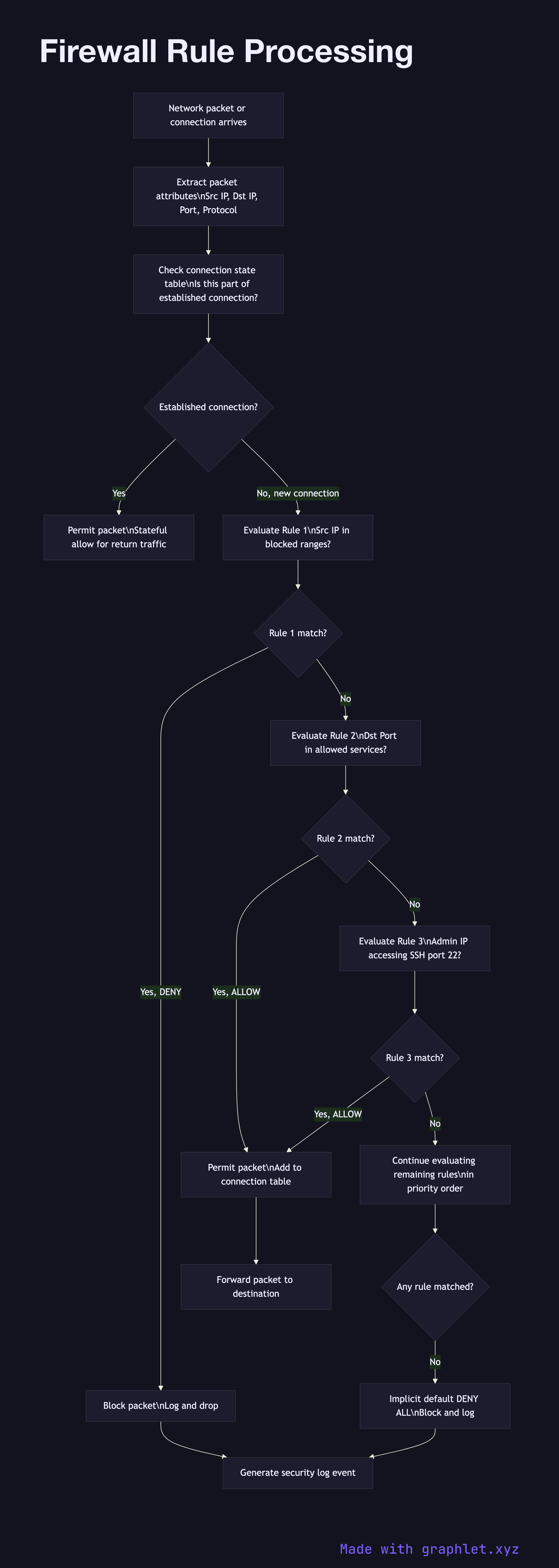
A firewall processes network traffic by evaluating each packet or connection against an ordered list of rules, permitting or denying traffic based on criteria like source IP, destination IP, port, protocol, and connection state.
Modern firewalls fall into several categories. Stateless (packet filter) firewalls evaluate each packet independently against static rules based on IP headers and port numbers — they are fast but cannot track connection state. Stateful firewalls maintain a connection tracking table, allowing them to permit return traffic for established connections automatically without explicit allow rules. Next-generation firewalls (NGFW) add application-layer inspection, deep packet inspection, and integration with threat intelligence feeds.
Rules are evaluated in order from first to last, and the first matching rule wins. This ordering is critical: placing broad DENY rules before specific ALLOW rules for the same traffic will block legitimate traffic. Most firewall policies end with an implicit DENY ALL rule that blocks everything not explicitly permitted — this is the "default deny" or "allowlist" model, which is more secure than "default permit".
Rule matching criteria: source and destination IP addresses (individual addresses, CIDR ranges, or named groups), source and destination ports (single ports, port ranges, or service names), protocol (TCP, UDP, ICMP), direction (inbound, outbound, or both), and connection state (NEW, ESTABLISHED, RELATED for stateful firewalls).
Cloud providers implement virtual firewalls as Security Groups (AWS, GCP, Azure) which operate statelessly on port/IP rules, and Network ACLs (AWS) which are stateless and evaluated in numbered order. Both have their own rule processing models. See Secure API Gateway for application-layer security and Threat Detection Pipeline for anomaly detection that complements firewall rules.