diagram.mmd — sequence
AI Tool Calling Flow sequence diagram

AI tool calling (also called function calling) is the mechanism by which a language model identifies the need for external information or action during generation, emits a structured tool invocation request, and resumes generation after receiving the tool's result.
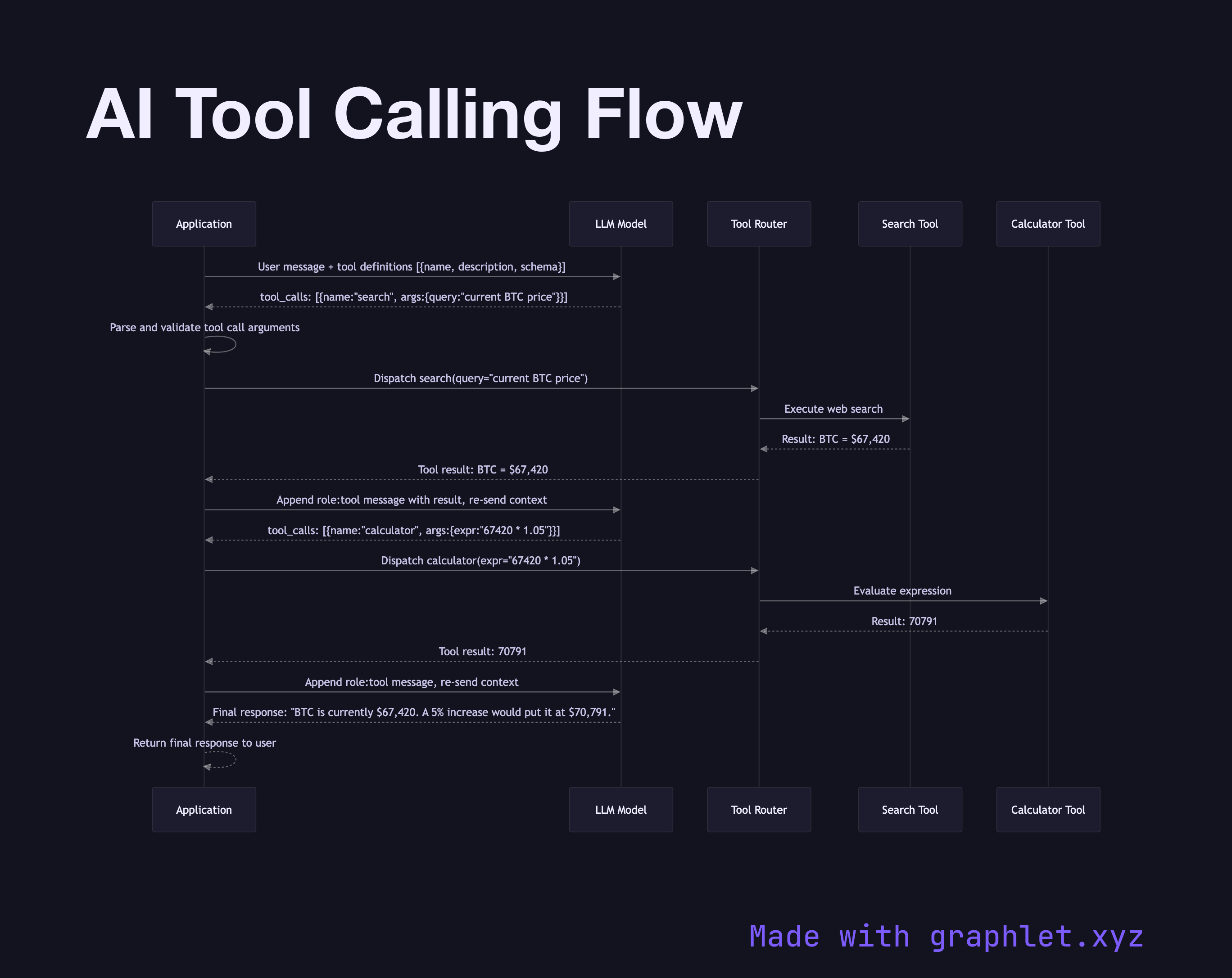
What the diagram shows

This sequence diagram traces a single tool-calling cycle between an application, the LLM, and two external tools:

1. User request: the application sends a user message along with a list of available tool definitions (name, description, JSON schema for parameters) in the API request. 2. LLM reasoning: the model determines that it needs external data to answer accurately and emits a tool_calls object instead of a text response, specifying the tool name and arguments. 3. Application parses tool call: the application layer extracts the tool name and validates the arguments against the expected schema. 4. Tool routing: the application routes the call to the correct tool implementation — a web search engine, calculator, database query, or external API. 5. Tool execution: the tool executes and returns a structured result. 6. Result injection: the application adds the tool result to the conversation as a role: tool message and re-sends the full context to the LLM. 7. LLM final generation: with the tool result in context, the model generates a final natural-language response that incorporates the new information. 8. Response returned: the final response is delivered to the user.

Why this matters

Tool calling transforms an LLM from a static knowledge base into a dynamic reasoning engine that can fetch live data, execute code, and interact with external systems. See AI Agent Workflow for how multi-step tool calling fits into a broader agentic loop.

Free online editor
Edit this diagram in Graphlet
Fork, modify, and export to SVG or PNG. No sign-up required.
Open in Graphlet →

Frequently asked questions

AI tool calling is a mechanism where a language model, instead of generating a text answer, emits a structured JSON request specifying a tool name and arguments. The calling application executes the tool and returns the result to the model as additional context, enabling the model to give accurate, up-to-date answers grounded in live data.
Tool definitions (name, description, JSON parameter schema) are included in the API request. When the model determines it needs external data, it outputs a `tool_calls` object instead of a text response. The application parses this, routes to the appropriate implementation, executes it, and re-sends the result to the model as a `role: tool` message before the model generates its final response.
Use tool calling when the required data is dynamic, transactional, or requires side effects — such as querying a live database, calling a payment API, or running code. Use RAG when the data is static or semi-static documents that benefit from semantic search retrieval rather than structured lookups.
Common mistakes include overly vague tool descriptions (causing the model to choose the wrong tool), schemas that allow ambiguous parameters, forgetting to handle the case where the model calls a tool with invalid arguments, and not enforcing maximum tool call rounds to prevent runaway loops.
mermaid
sequenceDiagram participant App as Application participant LLM as LLM Model participant Router as Tool Router participant Search as Search Tool participant Calc as Calculator Tool App->>LLM: User message + tool definitions [{name, description, schema}] LLM-->>App: tool_calls: [{name:"search", args:{query:"current BTC price"}}] App->>App: Parse and validate tool call arguments App->>Router: Dispatch search(query="current BTC price") Router->>Search: Execute web search Search-->>Router: Result: BTC = $67,420 Router-->>App: Tool result: BTC = $67,420 App->>LLM: Append role:tool message with result, re-send context LLM-->>App: tool_calls: [{name:"calculator", args:{expr:"67420 * 1.05"}}] App->>Router: Dispatch calculator(expr="67420 * 1.05") Router->>Calc: Evaluate expression Calc-->>Router: Result: 70791 Router-->>App: Tool result: 70791 App->>LLM: Append role:tool message, re-send context LLM-->>App: Final response: "BTC is currently $67,420. A 5% increase would put it at $70,791." App-->>App: Return final response to user
Copied to clipboard