diagram.mmd — flowchart
AI Agent Workflow flowchart diagram

An AI agent workflow is the autonomous plan-act-observe loop that allows a language model to break down a complex goal into sub-tasks, execute actions via tool calls, observe the results, and iteratively refine its approach until the goal is satisfied.
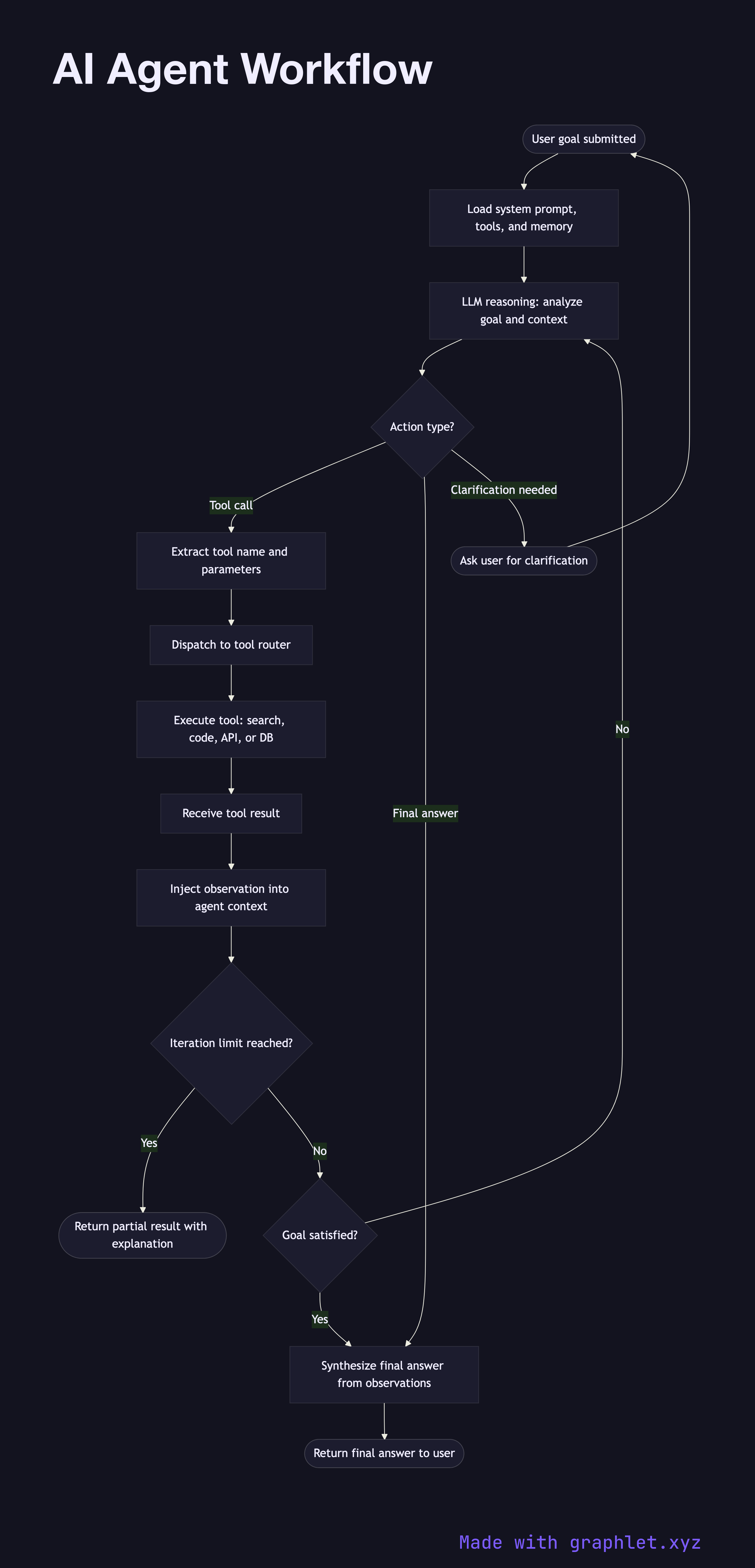
What the diagram shows

This flowchart maps the ReAct-style (Reasoning + Acting) loop used by most production AI agents:

1. User goal: a high-level objective is submitted to the agent (e.g., "Research the top 5 competitors and write a summary report"). 2. Agent initializes: the agent loads its system prompt, available tool definitions, and any relevant memory from previous sessions. 3. LLM reasoning step: the LLM receives the current context — goal, prior observations, tool results — and produces a structured thought about what to do next. 4. Action decision: the model decides whether to call a tool, generate a final answer, or request clarification. 5. Tool dispatch: if a tool call is required, the tool name and parameters are extracted and dispatched to the tool router (see AI Tool Calling Flow). 6. Tool execution: the tool (web search, code interpreter, database query, API call) executes and returns a result. 7. Observation injection: the tool result is injected back into the agent's context as an observation, extending the working memory. 8. Goal satisfied?: the agent evaluates whether the accumulated observations and tool outputs are sufficient to satisfy the original goal. 9. Final answer: if the goal is met, the agent synthesizes the observations into a coherent final response. 10. Max iterations check: a hard iteration limit prevents infinite loops. If exceeded, the agent returns a partial result with an explanation.

Why this matters

The ReAct loop is what separates stateless chatbots from goal-directed agents. Understanding the loop structure helps engineers set appropriate iteration limits, design effective tool interfaces, and debug runaway agent behavior.

Free online editor
Edit this diagram in Graphlet
Fork, modify, and export to SVG or PNG. No sign-up required.
Open in Graphlet →

Frequently asked questions

An AI agent workflow is the autonomous loop in which a language model repeatedly reasons about a goal, decides on an action (tool call or final answer), executes that action, observes the result, and updates its plan — continuing until the goal is satisfied or an iteration limit is reached.
The agent receives a user goal and initializes with a system prompt and tool definitions. At each step, the LLM produces a structured reasoning trace, selects a tool or decides to answer, the tool executes and returns an observation, and that observation is injected back into the context for the next reasoning step. This cycle repeats until the goal is met or the max iteration cap is hit.
Use an agent when the task requires multiple steps that depend on intermediate results, such as multi-hop research, code generation with test-feedback loops, or workflows that must interact with external APIs. Single calls suffice for tasks that can be resolved entirely from the model's existing knowledge.
Common failures include infinite loops (missing iteration caps), tool schema mismatches (the model passes invalid arguments), context window overflow from long tool outputs, and over-delegation (the agent calls tools for information it already has, wasting latency and tokens).
A chatbot responds to each user message independently, with no ability to take autonomous actions between turns. An AI agent maintains a goal across multiple internal reasoning-action-observation steps, can call tools without user prompting, and produces a final answer only after completing a task — not after each message.
mermaid
flowchart TD A([User goal submitted]) --> B[Load system prompt, tools, and memory] B --> C[LLM reasoning: analyze goal and context] C --> D{Action type?} D -- Tool call --> E[Extract tool name and parameters] E --> F[Dispatch to tool router] F --> G[Execute tool: search, code, API, or DB] G --> H[Receive tool result] H --> I[Inject observation into agent context] I --> J{Iteration limit reached?} J -- Yes --> K([Return partial result with explanation]) J -- No --> L{Goal satisfied?} L -- No --> C L -- Yes --> M[Synthesize final answer from observations] M --> N([Return final answer to user]) D -- Final answer --> M D -- Clarification needed --> O([Ask user for clarification]) O --> A
Copied to clipboard