AI Search System
An AI search system combines classical keyword retrieval with dense vector semantic search and LLM-based re-ranking to return highly relevant results for natural language queries — going beyond simple keyword matching to understand user intent.
An AI search system combines classical keyword retrieval with dense vector semantic search and LLM-based re-ranking to return highly relevant results for natural language queries — going beyond simple keyword matching to understand user intent.
What the diagram shows
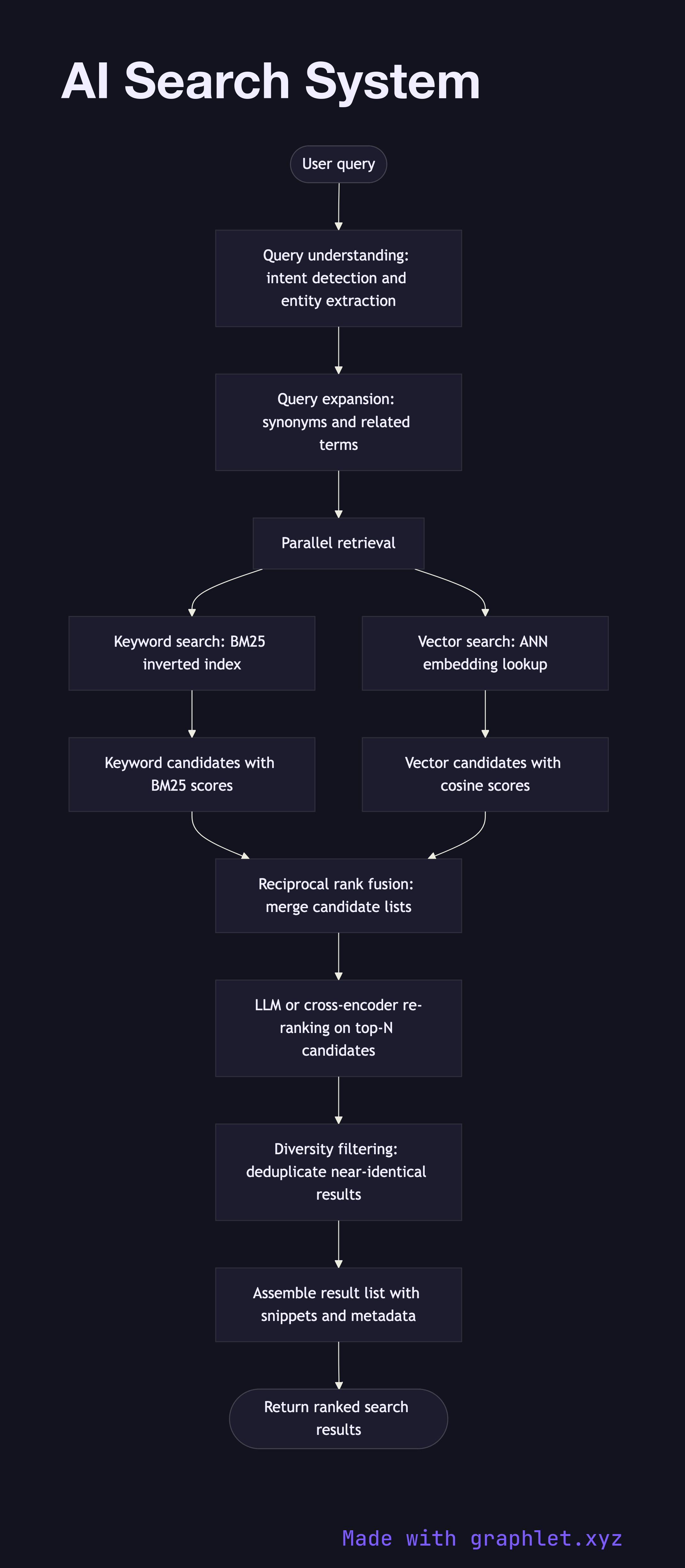
This flowchart maps the hybrid retrieval and ranking architecture used in modern AI search:
1. User query: a natural language search query is submitted. 2. Query understanding: the query is analyzed for intent, entities are extracted, and query expansion (synonyms, related terms) is optionally applied. 3. Parallel retrieval: the query is dispatched simultaneously to two retrieval systems: - Keyword search (BM25/inverted index): fast lexical matching that excels at exact-match recall. - Vector search (ANN): semantic embedding search that handles paraphrases and conceptual similarity (see Vector Database Query). 4. Result fusion: results from both retrieval paths are merged using Reciprocal Rank Fusion (RRF) or a learned fusion model, producing a unified candidate set. 5. LLM re-ranking: a cross-encoder or LLM scores each candidate against the query for relevance. This is more accurate than ANN alone but too slow to run over the full corpus. 6. Diversity filtering: near-duplicate results and results from the same source domain are deduped to improve result diversity. 7. Result assembly: the final ranked list is assembled with snippets, metadata, and relevance scores. 8. Response returned: results are returned to the user interface or downstream application.
Why this matters
Hybrid search consistently outperforms either keyword or vector search alone. The two-stage architecture — fast retrieval followed by accurate re-ranking — balances recall and precision while keeping latency manageable. See AI Ranking Pipeline for how ranking is applied more broadly.