diagram.mmd — flowchart
Prompt Processing Pipeline flowchart diagram

A prompt processing pipeline is the set of transformation steps that convert raw user input into the structured, context-enriched message array that is actually sent to a language model.
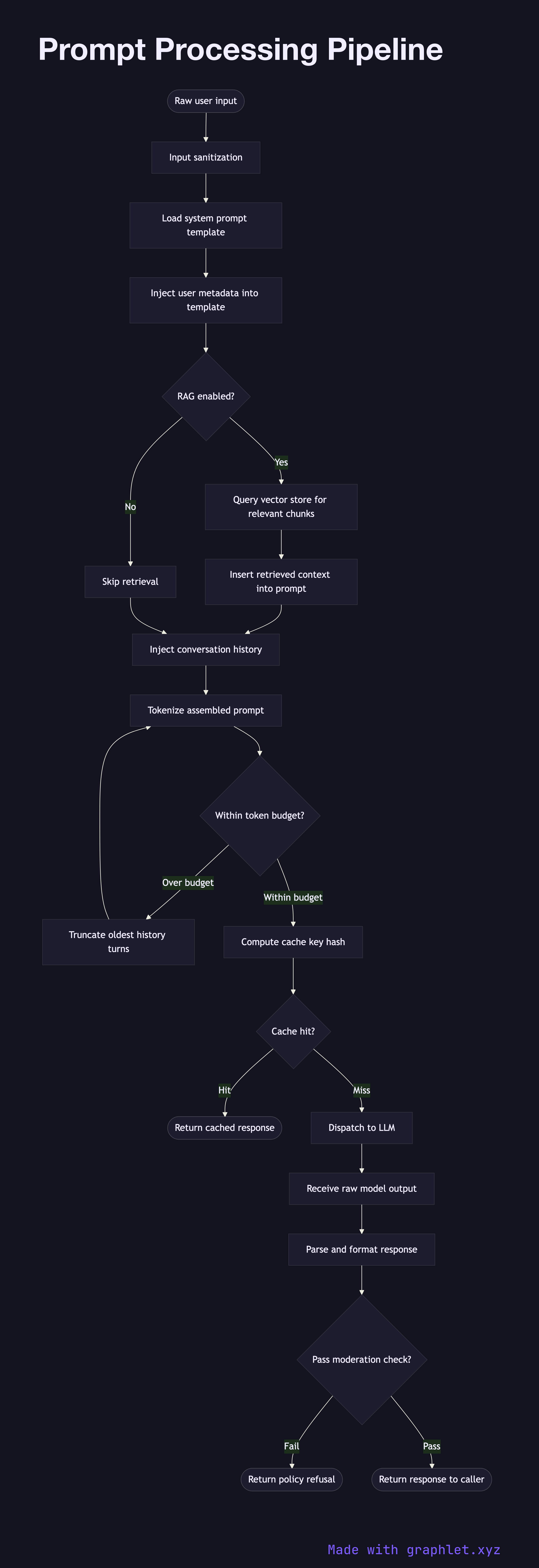
What the diagram shows

This flowchart illustrates each stage a message passes through before reaching the model:

1. Raw user input: the pipeline begins with the unprocessed text submitted by a user or an upstream system. 2. Input sanitization: special characters, injection patterns, and encoding anomalies are cleaned to prevent prompt injection attacks. 3. System prompt assembly: a base system prompt is loaded from a template store, parameterized with user metadata such as role, locale, or product context. 4. Retrieval augmentation: if the application uses RAG, relevant document chunks are retrieved from a vector store and inserted into the context window at this stage (see RAG Architecture). 5. Conversation history injection: prior turns from the session are prepended to maintain conversational continuity. 6. Token budget check: the assembled prompt is tokenized and measured against the model's context window limit. If the budget is exceeded, older history turns are truncated. 7. Cache key computation: a deterministic hash of the assembled prompt is computed to enable Prompt Cache System lookups. 8. Cache hit?: if an exact match exists in the prompt cache, the cached response is returned immediately, bypassing the model entirely. 9. LLM request: the final assembled prompt is dispatched to the model via the LLM Request Flow. 10. Response post-processing: the raw model output is parsed, formatted, and optionally passed through a moderation filter before being returned to the caller.

Why this matters

The quality of what a model produces is directly bounded by the quality of what it receives. A well-designed prompt processing pipeline ensures consistency, safety, and cost efficiency across every inference call.

Free online editor
Edit this diagram in Graphlet
Fork, modify, and export to SVG or PNG. No sign-up required.
Open in Graphlet →

Frequently asked questions

A prompt processing pipeline is the series of transformation steps that convert raw user input into the structured, context-enriched message array actually sent to a language model. It handles sanitization, system prompt assembly, RAG retrieval, conversation history injection, token budget management, and cache lookups before any model call is made.
After sanitizing and assembling the prompt from template, retrieved context, and conversation history, the assembled text is tokenized using the model's tokenizer to count tokens. The pipeline measures this count against the model's context window limit and truncates older history turns if the budget is exceeded, ensuring the final prompt always fits within the model's capacity.
Add prompt caching when the assembled prompt (especially the system prompt and retrieved context) is identical or nearly identical across many requests — for example, in documentation Q&A or template-driven generation. Computing a cache key at the end of assembly allows exact-match lookups that bypass the model entirely and cut both latency and cost.
Typical mistakes include skipping input sanitization (enabling prompt injection), assembling the system prompt after conversation history (wasting token budget on the wrong content), not truncating history in a consistent strategy (cutting mid-sentence), and forgetting to normalize whitespace before hashing for cache keys.
A chat template is a model-specific formatter that serializes a messages array into the exact token string the model was trained on (e.g., `[INST]...[/INST]`). A prompt processing pipeline is the broader application-layer workflow that builds the messages array — it handles retrieval, history management, and caching before the chat template is ever applied.
mermaid
flowchart TD A([Raw user input]) --> B[Input sanitization] B --> C[Load system prompt template] C --> D[Inject user metadata into template] D --> E{RAG enabled?} E -- Yes --> F[Query vector store for relevant chunks] F --> G[Insert retrieved context into prompt] E -- No --> H[Skip retrieval] G --> I[Inject conversation history] H --> I I --> J[Tokenize assembled prompt] J --> K{Within token budget?} K -- Over budget --> L[Truncate oldest history turns] L --> J K -- Within budget --> M[Compute cache key hash] M --> N{Cache hit?} N -- Hit --> O([Return cached response]) N -- Miss --> P[Dispatch to LLM] P --> Q[Receive raw model output] Q --> R[Parse and format response] R --> S{Pass moderation check?} S -- Fail --> T([Return policy refusal]) S -- Pass --> U([Return response to caller])
Copied to clipboard