Model Version Deployment
Model version deployment is the controlled process of promoting a newly trained model artifact from the registry through staging validation, canary rollout, and full production traffic — with automated rollback if live metrics degrade.
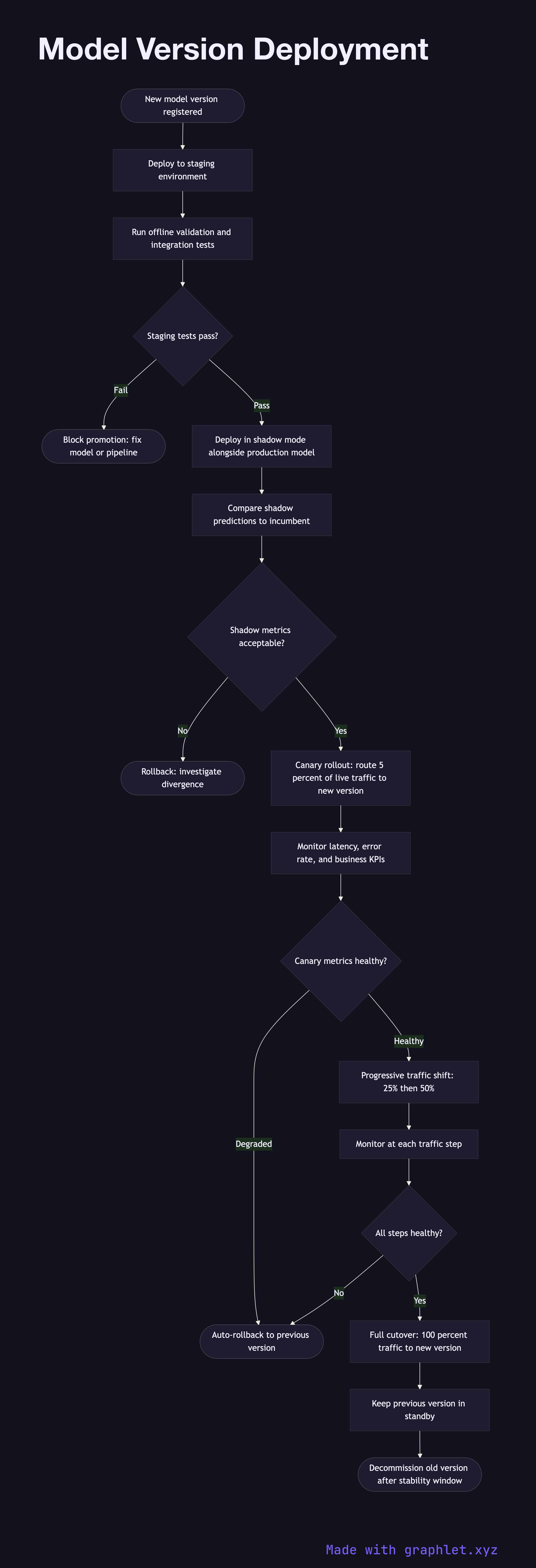
Model version deployment is the controlled process of promoting a newly trained model artifact from the registry through staging validation, canary rollout, and full production traffic — with automated rollback if live metrics degrade.
What the diagram shows
This flowchart covers the full promotion path from model registry to live serving:
1. Model registered: a new model version passes training evaluation and is written to the model registry with a version tag (see Model Training Pipeline). 2. Deploy to staging: the artifact is deployed to a staging environment that mirrors production infrastructure. 3. Offline validation: holdout evaluation and integration tests run against the staging deployment to catch serialization or runtime issues. 4. Shadow mode: the new model receives a copy of live production traffic and generates shadow predictions, but results are not returned to users. Shadow predictions are compared to the incumbent for consistency. 5. Canary rollout: a small percentage of live traffic (e.g., 1–5%) is routed to the new model version. Online metrics (latency, error rate, business KPIs) are monitored. 6. Canary health check: automated monitors compare canary metrics against baseline. A statistically significant degradation triggers an automatic rollback. 7. Progressive traffic increase: if canary metrics are healthy, traffic is progressively shifted — 10%, 25%, 50%, 100% — with monitoring gates between each step. 8. Full cutover: 100% of traffic is routed to the new version. The previous version is kept in standby for rapid rollback. 9. Decommission old version: after a stability window, the old version is retired from the registry.
Why this matters
Directly replacing a model in production is high risk. A staged deployment strategy — shadow, canary, progressive rollout — provides multiple safety nets, limiting the blast radius of any regression to a small fraction of users.