Clickstream Processing
Clickstream processing is the pipeline that collects the continuous sequence of navigation events a user generates while browsing a website or application — every page view, click, scroll, and hover — and transforms that high-volume, low-structure stream into session data and behavioral insights.
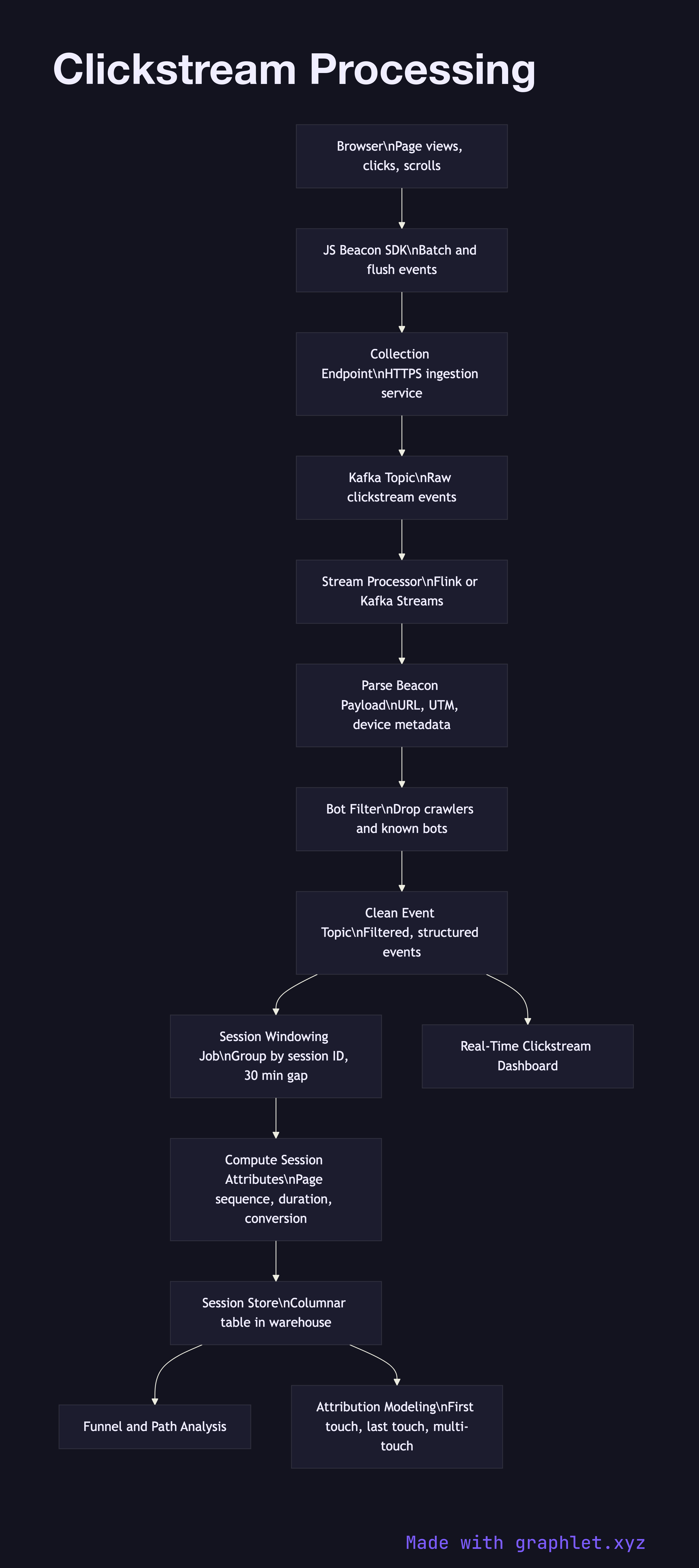
Clickstream processing is the pipeline that collects the continuous sequence of navigation events a user generates while browsing a website or application — every page view, click, scroll, and hover — and transforms that high-volume, low-structure stream into session data and behavioral insights.
Clickstream data is unique in its volume and velocity. A single active user can generate dozens of events per minute; a mid-sized e-commerce site with tens of thousands of concurrent users produces millions of raw events per hour. This scale demands a purpose-built pipeline that can ingest, deduplicate, and process that data in near-real-time without degrading the user-facing application.
At the collection layer, a JavaScript beacon or tag fires on each page interaction. Browser-side SDKs batch events locally for a short window (typically 2–5 seconds) and flush them as a single HTTPS POST to the collection endpoint. This batching reduces the number of network requests while keeping latency acceptable. The collection endpoint writes each batch immediately to a streaming topic — most commonly a Kafka topic — without blocking to do any transformation.
A stream processor reads from the topic and applies the first round of transformations: parsing the raw beacon payload, extracting the URL path and query parameters, mapping UTM parameters to campaign attributes, and applying a bot filter to discard known crawler user agents and IP ranges. Filtered events are re-emitted to a clean topic.
A session windowing job groups the clean events by session ID (a short-lived cookie value reset after 30 minutes of inactivity) and computes session-level attributes: session start time, page sequence, referrer, number of clicks, and whether a conversion event occurred. Completed sessions are written to a session store — a columnar table in a warehouse or data lake — where they can be queried for funnel analysis, path analysis, and attribution modeling. See User Behavior Tracking for how session data is further assembled into long-running user behavioral profiles, and Stream Analytics Architecture for the underlying streaming infrastructure.