Stream Analytics Architecture
A stream analytics architecture is a system designed to continuously ingest, process, and react to data in motion — applying queries, aggregations, and enrichments to records as they arrive rather than waiting for a batch window to close.
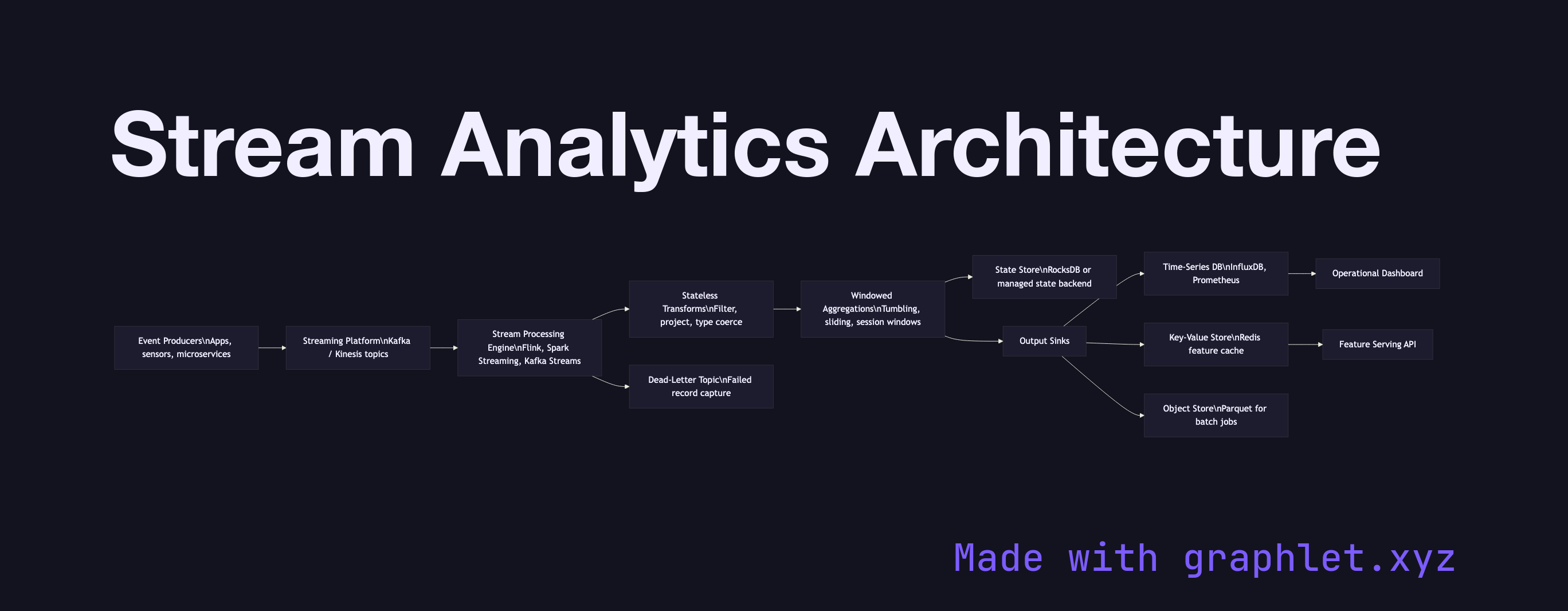
A stream analytics architecture is a system designed to continuously ingest, process, and react to data in motion — applying queries, aggregations, and enrichments to records as they arrive rather than waiting for a batch window to close.
Traditional batch analytics operates on data at rest: files or tables that accumulate over time before a job processes them. Stream analytics inverts this model. Data is processed the moment it enters the system, enabling use cases that batch processing cannot support — fraud detection within milliseconds of a transaction, live sports scoreboards, operational dashboards that reflect the current state of a running system, and dynamic pricing that adjusts to real-time demand.
The architecture begins at event producers: applications, sensors, microservices, or log shippers that emit records continuously. These records flow into a distributed streaming platform such as Apache Kafka or AWS Kinesis, which buffers the stream durably and allows multiple downstream consumers to read from it independently at their own pace.
A stream processing engine — Flink, Spark Streaming, Kafka Streams, or a managed service like Google Dataflow — consumes from the platform and applies the analytics logic. The core operations are stateless transforms (filtering, projection, type coercion applied per record) and stateful windowed aggregations (counting events per user in the last 60 seconds, summing revenue per product per minute). Windowing strategies — tumbling, sliding, and session windows — determine how records are grouped in time.
Processed results are written to one or more output sinks appropriate to the latency and access pattern of each consumer: a time-series database for operational dashboards (see Realtime Metrics Pipeline), a key-value store for low-latency feature serving, or an object store for downstream batch jobs. A dead-letter topic captures records that fail processing so they can be inspected and replayed without blocking the main pipeline. The Clickstream Processing diagram shows how this architecture is applied specifically to web session data.