Device Login Flow
The Device Login Flow (formally the OAuth2 Device Authorization Grant, RFC 8628) is designed for input-constrained devices that cannot easily display a full browser or accept keyboard input — smart TVs, game consoles, CLI tools, IoT devices, and media players.
The Device Login Flow (formally the OAuth2 Device Authorization Grant, RFC 8628) is designed for input-constrained devices that cannot easily display a full browser or accept keyboard input — smart TVs, game consoles, CLI tools, IoT devices, and media players.
The problem these devices face is that the standard OAuth2 Authorization Code Flow requires a browser to handle redirects. A CLI tool or a TV app cannot intercept a redirect URI the same way a web app can. The Device Authorization Grant solves this by splitting authentication across two devices: the constrained device (e.g., the TV) and a secondary device the user already trusts (their phone or laptop).
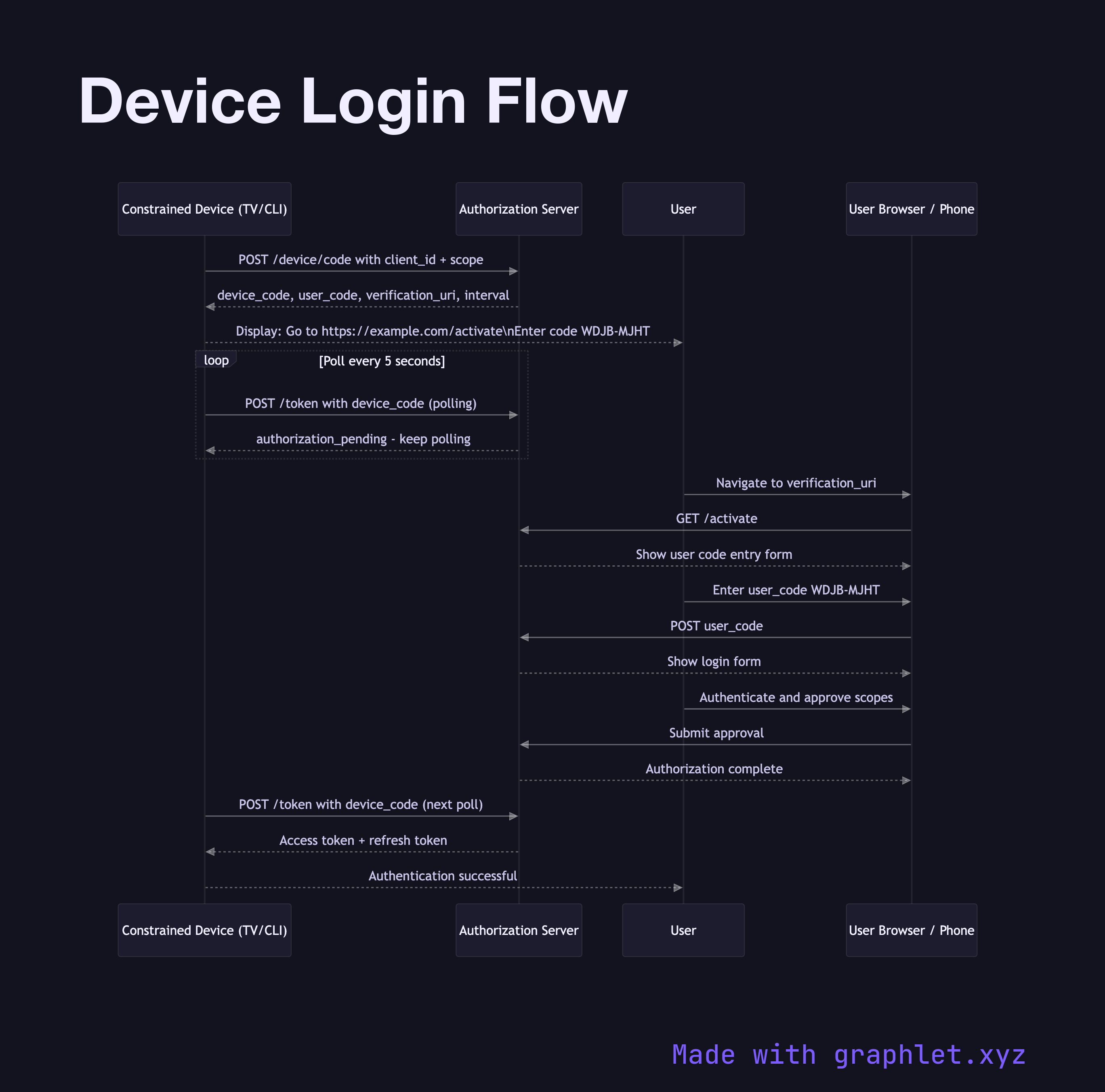
The flow begins with the constrained device making a POST to the authorization server's /device/code endpoint with its client_id and requested scope. The server responds with three values: a device_code (used by the device to poll), a user_code (a short, human-readable code like WDJB-MJHT), and a verification_uri (e.g., https://provider.com/activate). The device displays the user_code and verification_uri on screen and begins polling the /token endpoint every few seconds.
On their phone or laptop, the user navigates to the verification_uri, enters the user_code, logs in, and approves the access request. Back on the constrained device, one of the next polling attempts returns a successful response with access and refresh tokens. The device stores the tokens and is now authenticated — with no keyboard entry of passwords required.
This flow is the basis for "Sign in on your TV" experiences from YouTube, Netflix, and GitHub's gh auth login CLI command. Token management after this point follows the same patterns as other OAuth2 flows — see Refresh Token Rotation.