Two Factor Authentication
Two-factor authentication (2FA) adds a second verification step to the login process, requiring users to prove both something they know (their password) and something they have (a physical device or app). This dramatically reduces account takeover risk: even if a password is compromised in a data breach, an attacker cannot log in without also controlling the user's second factor.
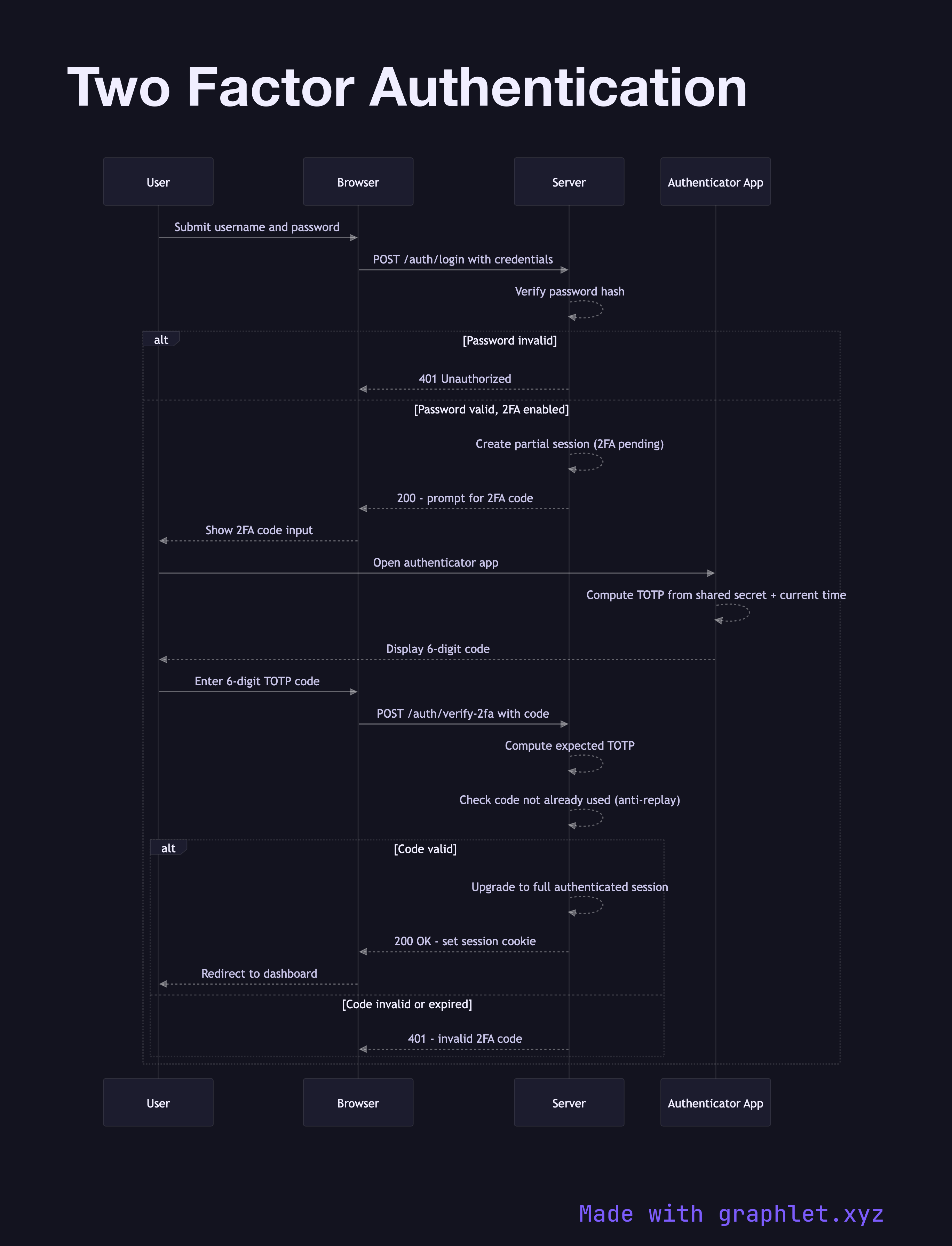
Two-factor authentication (2FA) adds a second verification step to the login process, requiring users to prove both something they know (their password) and something they have (a physical device or app). This dramatically reduces account takeover risk: even if a password is compromised in a data breach, an attacker cannot log in without also controlling the user's second factor.
The most common second factor for developer-focused apps is TOTP (Time-based One-Time Password), defined in RFC 6238. During enrollment, the server generates a shared secret and presents it to the user as a QR code. The user scans it with an authenticator app (Google Authenticator, Authy, 1Password). Both the server and the app independently compute a 6-digit code by running HMAC-SHA1 over the shared secret and the current 30-second time window. Because both sides use the same secret and the same timestamp, they produce the same code without any network communication.
The login flow is a two-step process. First, the user submits their username and password. If valid, rather than issuing a session or token immediately, the server transitions the user to a partial authentication state — a temporary, limited session that permits only the 2FA verification endpoint. The server asks for the TOTP code.
The user opens their authenticator app, reads the 6-digit code, and submits it. The server computes the expected TOTP for the current time window (and optionally the previous window to handle clock drift), compares it to the submitted code, and checks that this code hasn't been used before (preventing replay attacks within the same 30-second window). If valid, the server upgrades the partial session to a full authenticated session.
Recovery codes — a set of pre-generated single-use backup codes — should always be provided at enrollment time to prevent lockout if the user loses their authenticator device. For passwordless alternatives, see Magic Link Login.