diagram.mmd — sequence
Magic Link Login sequence diagram

Magic link login is a passwordless authentication pattern where users log in by clicking a one-time URL sent to their email address. Possession of the email account serves as the proof of identity, eliminating the need for users to remember and manage passwords.
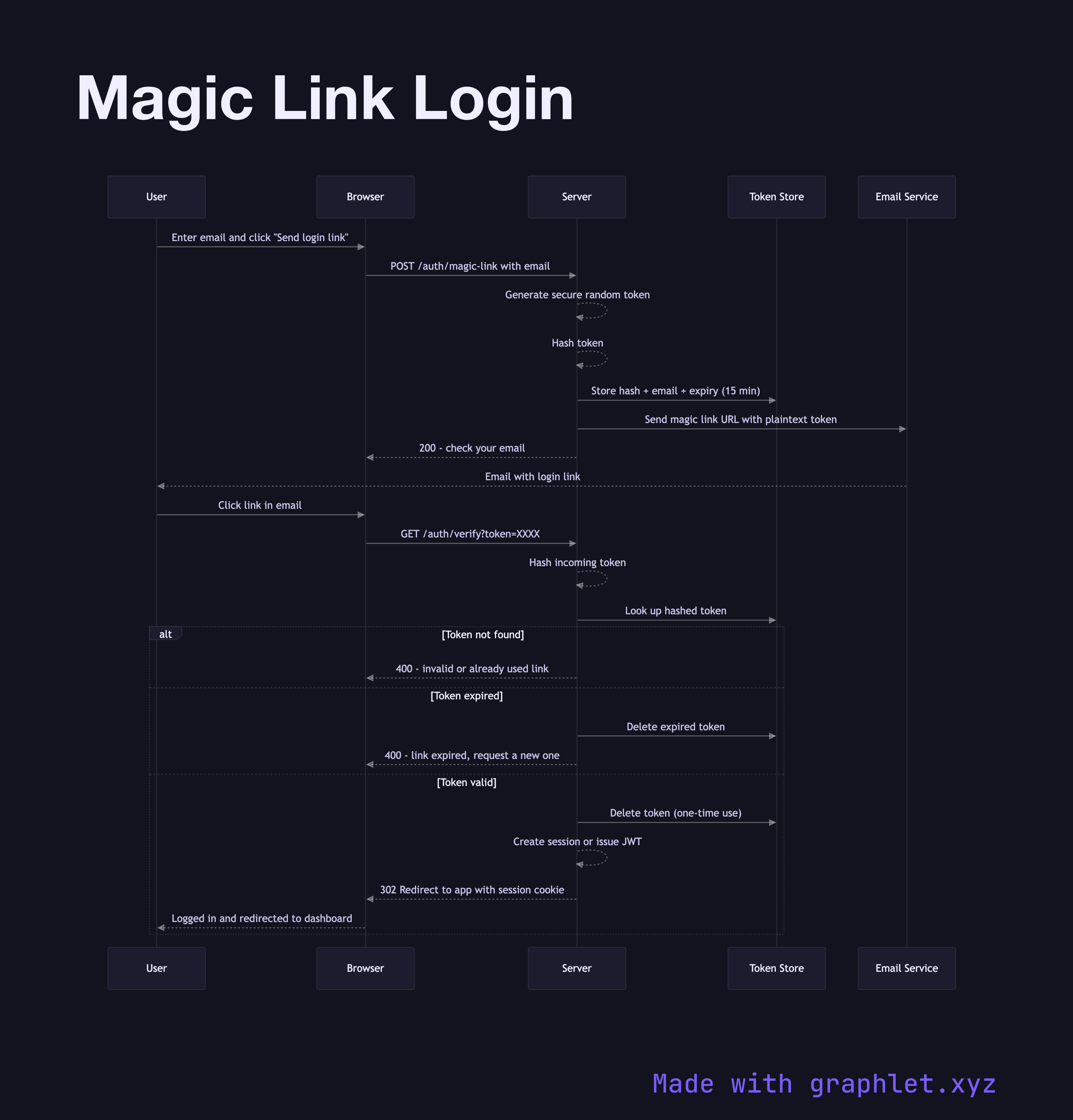
The flow begins when a user enters their email and requests a login link. The server generates a cryptographically random single-use token, hashes it for storage, and stores the hash alongside the user's email and an expiry timestamp (typically 10–30 minutes). The server embeds the plaintext token in a login URL and sends it via email. The user's browser is held at a "check your email" screen.

When the user clicks the link in their email client, the browser sends the token to the server. The server hashes the incoming token, looks it up in the store, checks the expiry, and — crucially — deletes the token record immediately upon successful lookup. This one-time-use property means that even if someone later intercepts the email, the link is already spent. After validation, the server creates a new session or issues a JWT and redirects the user into the application.

Security considerations are important. The magic link flow relies entirely on email security as its authentication factor — if the user's email is compromised, so is their app account. Links must expire quickly, and clicking the link from a different browser or device than expected is a potential phishing signal (some implementations display a warning or require a secondary confirm). Rate limiting on the link request endpoint prevents email flooding.

Magic links trade password management complexity for dependency on reliable email delivery. They work especially well for B2B SaaS apps and developer tools where users check email frequently. Compare the Password Reset Flow, which follows essentially the same token mechanics. Social Login Flow is another passwordless option.

Free online editor
Edit this diagram in Graphlet
Fork, modify, and export to SVG or PNG. No sign-up required.
Open in Graphlet →

Frequently asked questions

Magic link authentication is a passwordless login method where the server emails the user a one-time URL containing a short-lived token. Clicking the link authenticates the user — possession of the email account serves as the proof of identity, eliminating passwords entirely.
The user enters their email and requests a login link. The server generates a cryptographically random token, hashes it for storage alongside the email and an expiry timestamp, and embeds the plaintext token in a URL sent by email. When the user clicks the link, the server hashes the incoming token, validates the hash match and expiry, deletes the token record immediately (making it single-use), and issues a session or JWT.
Magic links inherit the security of the user's email account — a compromised inbox means a compromised app account. Set short expiry times (10–30 minutes). Rate-limit the link request endpoint to prevent email flooding. Delete the token immediately on first use. Consider flagging cross-device link usage (user requested on desktop, clicked on mobile) as a potential phishing signal.
Magic links work best for B2B SaaS, developer tools, and low-friction consumer apps where users check email regularly and the convenience of not managing passwords outweighs the dependency on email delivery. They are less suitable for applications where users need immediate access in environments with unreliable email (e.g., corporate firewalls) or where ultra-low login latency is critical.
mermaid
sequenceDiagram participant User participant Client as Browser participant Server participant DB as Token Store participant Email as Email Service User->>Client: Enter email and click "Send login link" Client->>Server: POST /auth/magic-link with email Server-->>Server: Generate secure random token Server-->>Server: Hash token Server->>DB: Store hash + email + expiry (15 min) Server->>Email: Send magic link URL with plaintext token Server-->>Client: 200 - check your email Email-->>User: Email with login link User->>Client: Click link in email Client->>Server: GET /auth/verify?token=XXXX Server-->>Server: Hash incoming token Server->>DB: Look up hashed token alt Token not found Server-->>Client: 400 - invalid or already used link else Token expired Server->>DB: Delete expired token Server-->>Client: 400 - link expired, request a new one else Token valid Server->>DB: Delete token (one-time use) Server-->>Server: Create session or issue JWT Server-->>Client: 302 Redirect to app with session cookie Client-->>User: Logged in and redirected to dashboard end
Copied to clipboard