diagram.mmd — sequence
Password Reset Flow sequence diagram

A password reset flow allows users to regain access to their account when they've forgotten their password. Implementing it securely is critical: a poorly designed reset flow can become a backdoor into user accounts.
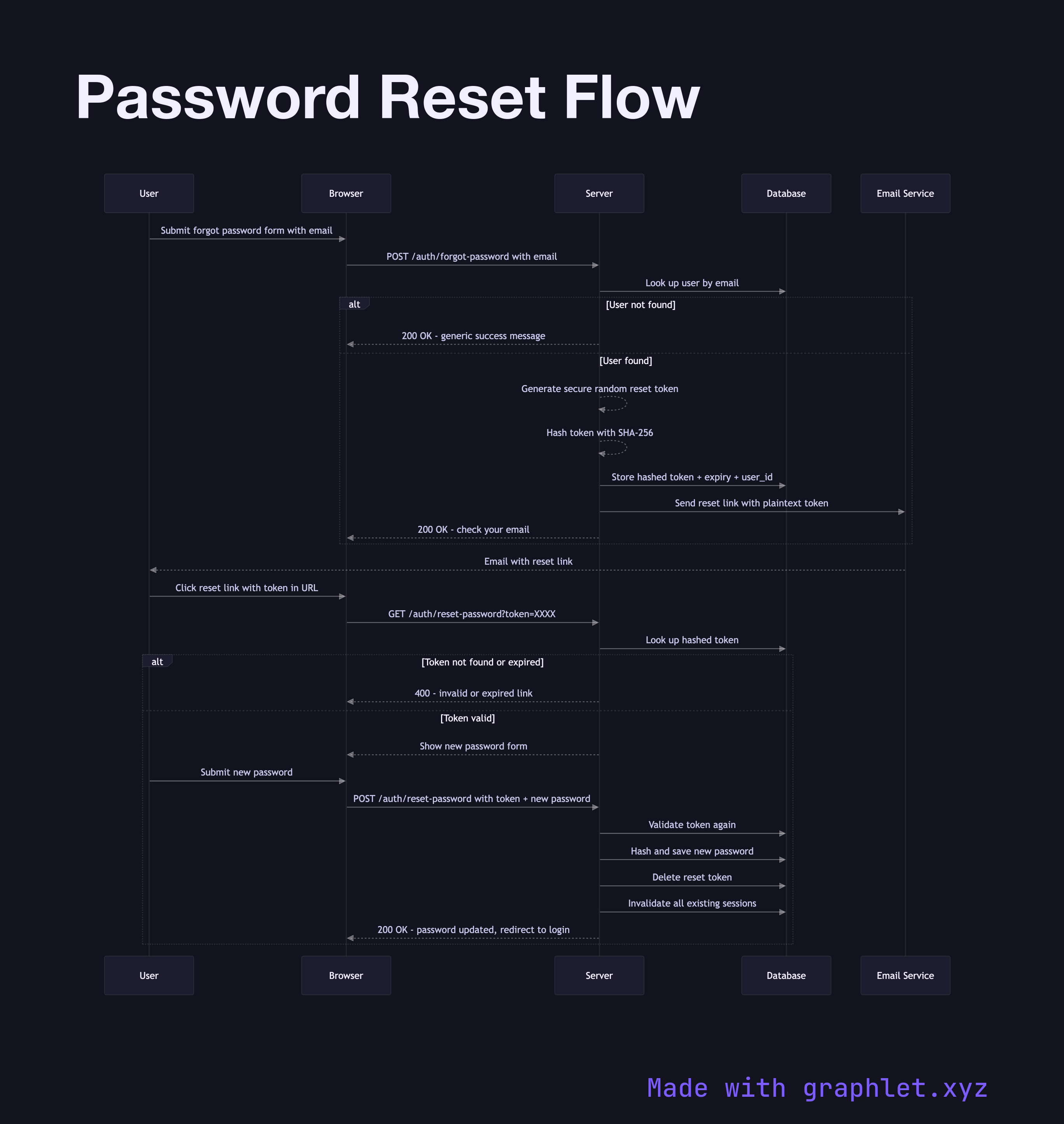
The flow begins when a user clicks "Forgot Password" and submits their email address. To prevent user enumeration — leaking whether an account exists — the server responds with the same message regardless of whether the email is registered: "If an account with that email exists, a reset link has been sent." This prevents attackers from probing which emails are registered.

Internally, if the email matches an account, the server generates a cryptographically random reset token — typically 32 bytes from a secure random source, encoded as hex or Base64. The token is hashed (using a fast hash like SHA-256) and stored in the database alongside the user ID and an expiry timestamp (15–60 minutes is common). The plaintext token is embedded in a reset URL and sent by email.

When the user clicks the link, the server extracts the token from the URL, hashes it, looks up the hash in the database, and checks the expiry. If valid, the user is presented with a form to enter a new password. On submission, the server validates the token again (preventing race conditions), hashes the new password using a proper password hashing algorithm (bcrypt, Argon2, or scrypt), updates the user's password, and immediately invalidates the reset token — as well as all existing sessions for that user. This last step is critical: if an attacker triggered the reset, forcing all sessions to expire blocks any unauthorized access already in progress.

For passwordless alternatives that eliminate the reset problem entirely, compare Magic Link Login. Adding Two Factor Authentication alongside passwords is a complementary security layer.

Free online editor
Edit this diagram in Graphlet
Fork, modify, and export to SVG or PNG. No sign-up required.
Open in Graphlet →

Frequently asked questions

A password reset flow allows users to regain account access after forgetting their password. The server sends a time-limited, single-use token to the user's email address. The user clicks the link, enters a new password, and the server updates the credential and invalidates all existing sessions.
The server generates 32 bytes from a cryptographically secure random source, encodes it as hex or Base64, hashes it with SHA-256, and stores the hash alongside the user ID and expiry timestamp. The plaintext token is sent in the email URL. On redemption, the server hashes the incoming token and compares it to the stored hash — the plaintext is never stored, so a database breach does not expose valid reset links.
User enumeration is when an attacker can determine whether an email address is registered by observing different server responses. To prevent it, the server always returns the same message — "if an account exists, a reset email has been sent" — regardless of whether the email is registered. The actual email is only sent if the address matches an account.
All existing sessions and refresh tokens for the user should be invalidated immediately after a successful password reset. If an attacker triggered the reset, any sessions they may have obtained are terminated. This is a critical step that is frequently missed — neglecting it allows an attacker who has hijacked a session to maintain access even after the password is changed.
mermaid
sequenceDiagram participant User participant Client as Browser participant Server participant DB as Database participant Email as Email Service User->>Client: Submit forgot password form with email Client->>Server: POST /auth/forgot-password with email Server->>DB: Look up user by email alt User not found Server-->>Client: 200 OK - generic success message else User found Server-->>Server: Generate secure random reset token Server-->>Server: Hash token with SHA-256 Server->>DB: Store hashed token + expiry + user_id Server->>Email: Send reset link with plaintext token Server-->>Client: 200 OK - check your email end Email-->>User: Email with reset link User->>Client: Click reset link with token in URL Client->>Server: GET /auth/reset-password?token=XXXX Server->>DB: Look up hashed token alt Token not found or expired Server-->>Client: 400 - invalid or expired link else Token valid Server-->>Client: Show new password form User->>Client: Submit new password Client->>Server: POST /auth/reset-password with token + new password Server->>DB: Validate token again Server->>DB: Hash and save new password Server->>DB: Delete reset token Server->>DB: Invalidate all existing sessions Server-->>Client: 200 OK - password updated, redirect to login end
Copied to clipboard