diagram.mmd — sequence
OpenID Connect Flow sequence diagram

OpenID Connect (OIDC) is an identity layer built on top of OAuth2 that lets applications verify the identity of a user and obtain basic profile information. While OAuth2 alone answers "is this user authorized to access this resource?", OIDC adds the answer to "who is this user?"
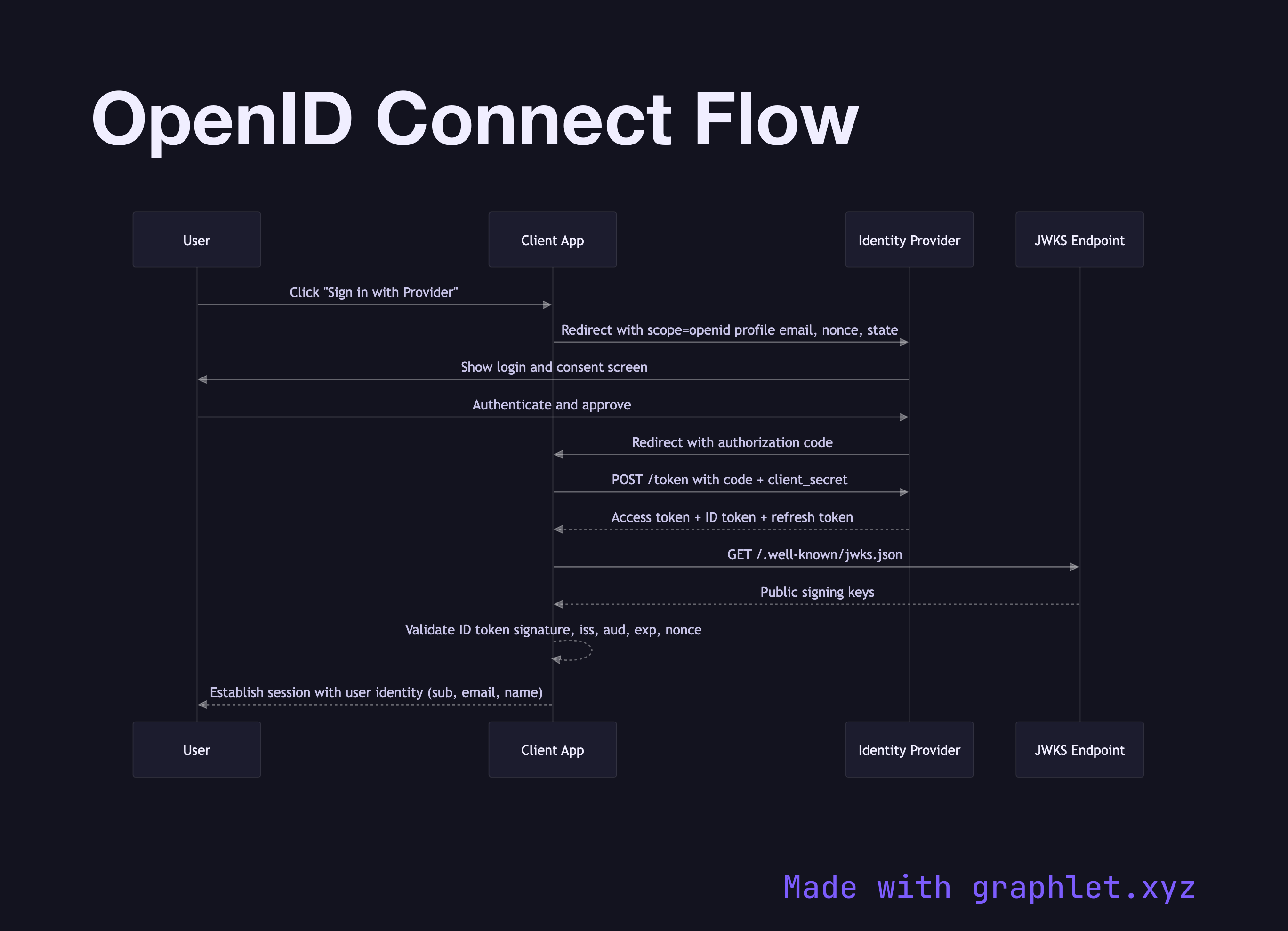
The OIDC flow looks nearly identical to the OAuth2 Authorization Code Flow, with one key addition: the client requests the openid scope, which instructs the authorization server to include an ID token alongside the access token.

The flow begins with a browser redirect to the identity provider (IdP). The client includes scope=openid profile email (and optionally other standard scopes) plus a nonce — a random value embedded in the authorization request and later verified inside the ID token to prevent replay attacks. After the user authenticates and consents, the IdP redirects back with an authorization code.

The client exchanges the code for three tokens: an access token (for calling APIs), a refresh token (for long-lived sessions), and an ID token. The ID token is a JWT whose payload contains claims about the user: sub (a stable unique user identifier), iss (the issuer URL), aud (the client_id), exp (expiry), iat (issued at), nonce, plus any requested profile claims like name, email, and picture.

The client validates the ID token's signature against the IdP's public keys (fetched from the JWKS endpoint), verifies iss, aud, exp, and nonce, and then trusts the sub claim as the user's identity. This eliminates the need for a separate /userinfo call in most cases.

OIDC is the standard powering Social Login Flow via Google, GitHub, and Apple, and it underpins most modern SSO Architecture implementations. Enterprise deployments often compare it against SAML Authentication Flow, which solves the same problem with XML-based assertions.

Free online editor
Edit this diagram in Graphlet
Fork, modify, and export to SVG or PNG. No sign-up required.
Open in Graphlet →

Frequently asked questions

OpenID Connect (OIDC) is an identity layer built on top of OAuth2 that enables applications to verify a user's identity and retrieve basic profile information. It standardises authentication where OAuth2 only standardises authorization, adding the concept of an ID token that carries verified user claims.
OAuth2 is an authorization framework that grants a client permission to access resources on behalf of a user — it answers "is this user allowed?". OpenID Connect extends OAuth2 to also answer "who is this user?" by issuing an ID token containing verified identity claims such as `sub`, `email`, and `name`. OIDC requires the `openid` scope, which triggers the ID token issuance.
After receiving the ID token, the client fetches the identity provider's public keys from its JWKS endpoint and verifies the token's signature. It then validates that `iss` matches the expected issuer, `aud` matches its own `client_id`, `exp` is in the future, and the `nonce` matches the value sent in the original authorization request. Only after all checks pass should the `sub` claim be trusted as the user's identity.
Use OIDC for modern web and mobile applications, SPAs, and APIs — it uses JSON and JWTs, integrates naturally with REST, and has broad library support. Use SAML when integrating with legacy enterprise systems or when an organization's IT policy mandates SAML-based SSO. Greenfield projects almost always favour OIDC for its simpler implementation and smaller protocol overhead.
OIDC defines standard scopes beyond `openid`: `profile` requests name and profile picture claims, `email` requests the email address and verification status, `address` requests postal address, and `phone` requests phone number. Providers may offer additional custom scopes for application-specific claims.
mermaid
sequenceDiagram participant User participant Client as Client App participant IdP as Identity Provider participant JWKS as JWKS Endpoint User->>Client: Click "Sign in with Provider" Client->>IdP: Redirect with scope=openid profile email, nonce, state IdP->>User: Show login and consent screen User->>IdP: Authenticate and approve IdP->>Client: Redirect with authorization code Client->>IdP: POST /token with code + client_secret IdP-->>Client: Access token + ID token + refresh token Client->>JWKS: GET /.well-known/jwks.json JWKS-->>Client: Public signing keys Client-->>Client: Validate ID token signature, iss, aud, exp, nonce Client-->>User: Establish session with user identity (sub, email, name)
Copied to clipboard