diagram.mmd — flowchart
Alerting Workflow flowchart diagram

An alerting workflow defines the end-to-end path from a detected anomaly in metrics or logs through notification, acknowledgement, and resolution — ensuring the right engineer is paged at the right time with enough context to act quickly.
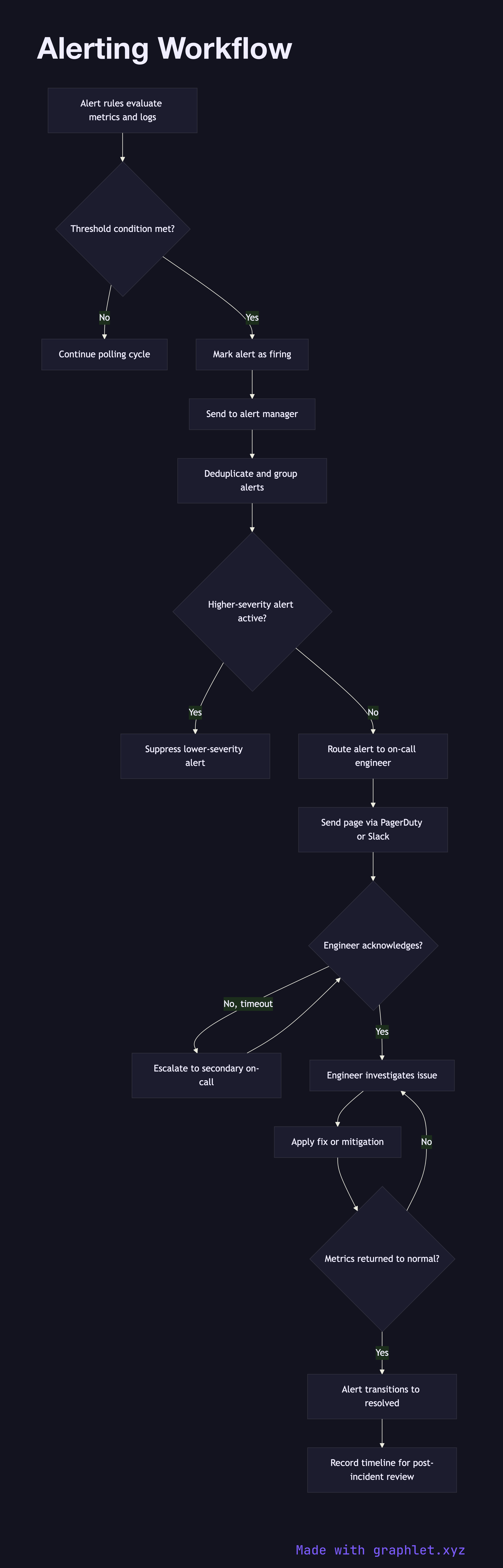
How the workflow works

The workflow begins with alert rules defined against a metrics or log data source. Each rule specifies a threshold condition (e.g., "HTTP error rate above 5% for 5 consecutive minutes"), a severity level, and the routing labels that determine who gets paged. The alerting engine evaluates every rule on each data polling cycle.

When a rule condition is met, the engine marks the alert as firing and sends it to an alert manager (Prometheus Alertmanager, PagerDuty, OpsGenie). The alert manager applies deduplication to suppress redundant copies of the same alert, groups related alerts by service or region to reduce noise, and applies inhibition rules to suppress lower-severity alerts when a higher-severity parent alert is already firing.

After grouping and deduplication, the alert manager routes the alert to the appropriate responder — the on-call engineer for the affected service — via configured channels: PagerDuty page, Slack message, or email. The on-call engineer receives the notification with a link to the relevant dashboard and runbook.

The engineer acknowledges the alert to stop escalation. Acknowledgement starts the incident clock. The engineer investigates, applies a fix or mitigation, and confirms the service is healthy. Once the underlying metrics return to normal, the alert transitions to resolved and the alert manager sends a resolution notification. The full timeline is recorded for the post-incident review.

See Incident Management Flow for how a firing alert escalates into a formal incident.

Free online editor
Edit this diagram in Graphlet
Fork, modify, and export to SVG or PNG. No sign-up required.
Open in Graphlet →

Frequently asked questions

An alerting workflow defines the end-to-end path from a detected anomaly in metrics or logs, through notification routing and acknowledgement, to resolution. It ensures the right engineer is paged at the right time with enough context to act quickly.
Alertmanager receives alerts from the Prometheus evaluation engine, deduplicates redundant copies of the same alert, groups related alerts by configured labels (e.g., service or region), applies inhibition rules to suppress lower-severity noise, and routes the grouped alert to the correct receiver — PagerDuty, Slack, or email — based on routing rules.
Use grouping when a single failure generates many alerts across services to avoid notification storms. Use inhibition when a high-severity alert (entire region down) makes lower-severity child alerts (individual service degraded) redundant, so on-call engineers focus on the root cause.
The most common mistakes are setting thresholds too low (alert fatigue from constant noise), not configuring deduplication (the same alert paging multiple times), and writing alert rules without linked runbooks (leaving engineers without remediation guidance).
mermaid
flowchart TD Rules[Alert rules evaluate metrics and logs] --> Condition{Threshold condition met?} Condition -->|No| Continue[Continue polling cycle] Condition -->|Yes| Firing[Mark alert as firing] Firing --> AlertManager[Send to alert manager] AlertManager --> Dedup[Deduplicate and group alerts] Dedup --> Inhibit{Higher-severity alert active?} Inhibit -->|Yes| Suppress[Suppress lower-severity alert] Inhibit -->|No| Route[Route alert to on-call engineer] Route --> Notify[Send page via PagerDuty or Slack] Notify --> Ack{Engineer acknowledges?} Ack -->|No, timeout| Escalate[Escalate to secondary on-call] Escalate --> Ack Ack -->|Yes| Investigate[Engineer investigates issue] Investigate --> Resolve[Apply fix or mitigation] Resolve --> MetricsNormal{Metrics returned to normal?} MetricsNormal -->|No| Investigate MetricsNormal -->|Yes| Resolved[Alert transitions to resolved] Resolved --> PostReview[Record timeline for post-incident review]
Copied to clipboard