Disaster Recovery Plan
A disaster recovery (DR) plan is the documented set of procedures for restoring a system to operation after a catastrophic failure — a data center outage, data corruption, ransomware attack, or accidental deletion — within defined Recovery Time Objective (RTO) and Recovery Point Objective (RPO) targets.
A disaster recovery (DR) plan is the documented set of procedures for restoring a system to operation after a catastrophic failure — a data center outage, data corruption, ransomware attack, or accidental deletion — within defined Recovery Time Objective (RTO) and Recovery Point Objective (RPO) targets.
How the plan works
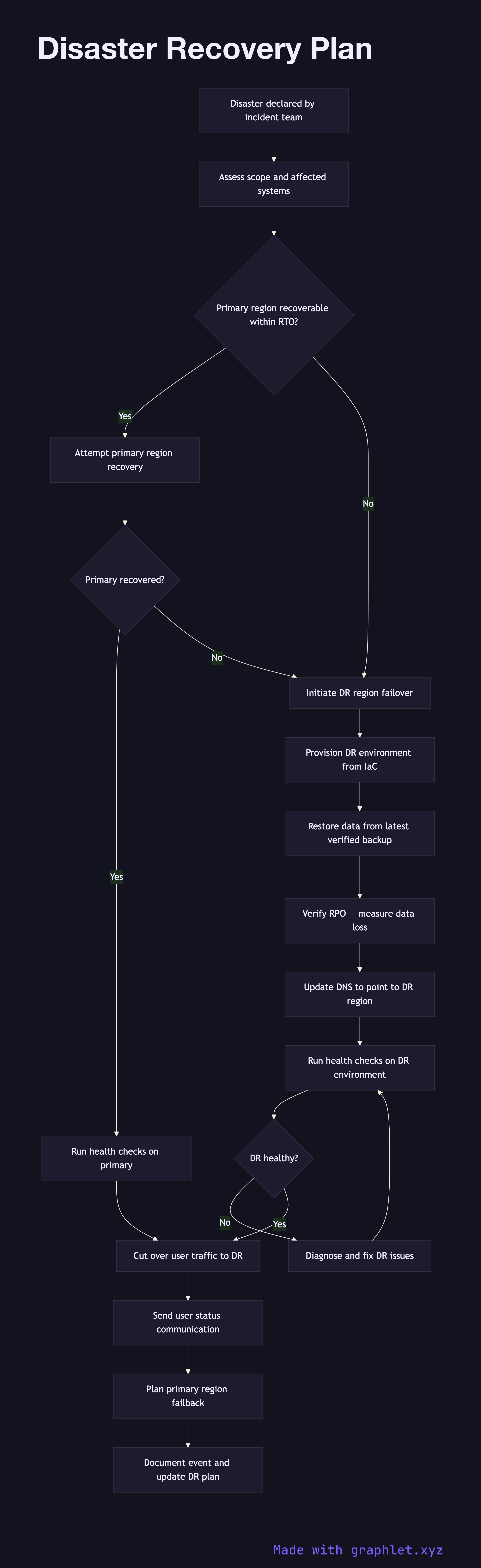
A disaster is declared when an incident (see Incident Management Flow) is assessed as unrecoverable through normal rollback or mitigation — the primary environment is completely unavailable or data integrity is compromised. The DR runbook is activated and the on-call team switches to the DR communication channel.
The first step is to assess the scope of the disaster: which systems are affected, whether data loss has occurred, and whether the primary region is expected to recover within the RTO window. If recovery-in-place is feasible and within RTO, the team attempts primary region recovery. If not, failover to the DR region begins.
Failover provisions the DR environment using the latest Infrastructure as Code definitions (see Infrastructure Provisioning) and restores data from the most recent verified backup (see Backup Verification). The data age of the backup determines the actual RPO — the amount of data lost. DNS records and load balancer configurations are updated to route traffic to the DR region.
Once the DR environment is operational and health checks pass, traffic is cut over and user communications are sent. After primary region recovery, a failback procedure migrates any data written to DR back to the primary region. The DR event is documented in full, and the plan is updated with lessons learned.