Artifact Storage Pipeline
An artifact storage pipeline manages the lifecycle of build outputs — capturing, versioning, scanning, and distributing binaries, container images, and packages so every environment deploys exactly the artifact that was tested.
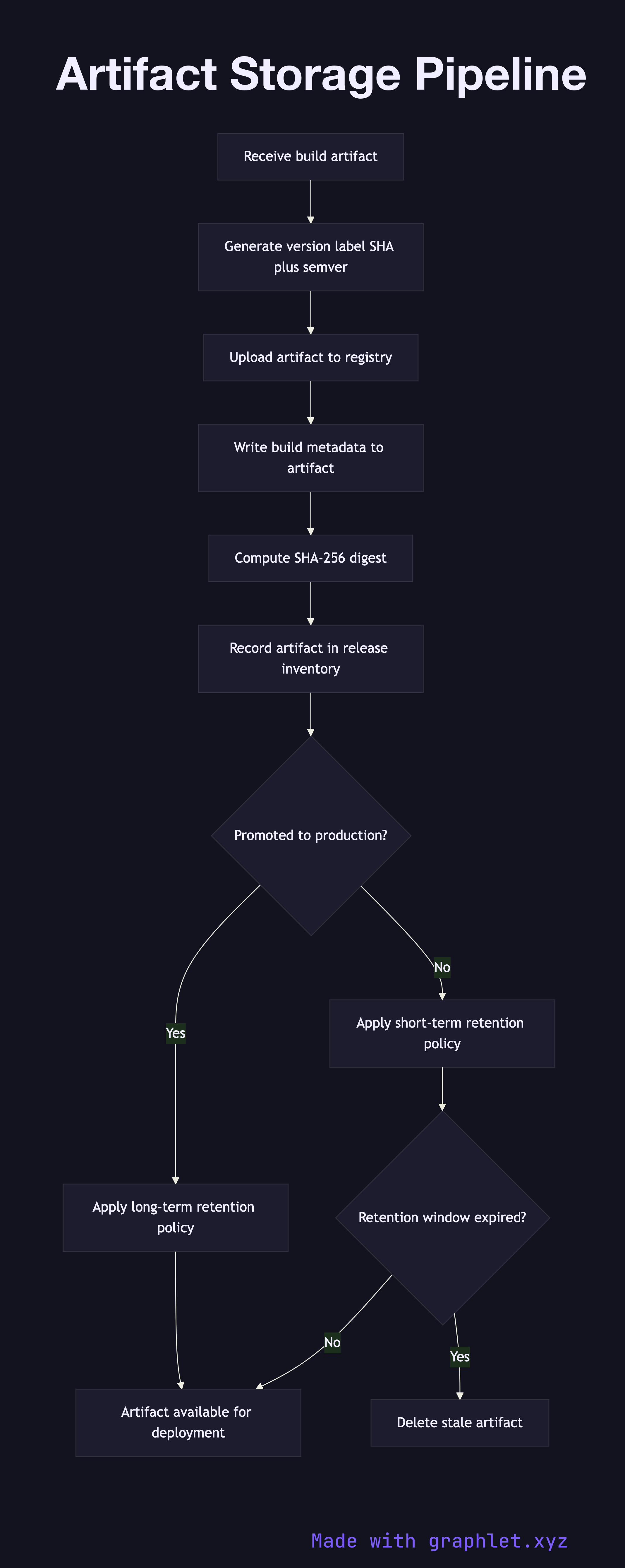
An artifact storage pipeline manages the lifecycle of build outputs — capturing, versioning, scanning, and distributing binaries, container images, and packages so every environment deploys exactly the artifact that was tested.
How the pipeline works
Once a Build Pipeline produces a validated artifact, the artifact storage pipeline takes ownership. The first step generates a unique version identifier, typically combining the semantic version with the short Git commit SHA to produce an immutable label like v1.4.2-a3f9b1c.
The artifact — whether a Docker image, JAR, npm package, or ZIP archive — is then uploaded to the appropriate registry. Container images go to a container registry (Docker Hub, Amazon ECR, GCR); library packages go to a package repository (Nexus, Artifactory, npm private registry). Metadata is written alongside the artifact: build timestamp, source commit, pipeline run ID, and the name of the signing key used to attest the artifact.
After upload, the pipeline records the artifact's cryptographic digest (SHA-256) and stores it in a release inventory. This inventory is the authoritative source of truth for the CD Pipeline, which queries it to find the correct artifact for each target environment.
Retention policies govern how long artifacts live. Artifacts promoted to production are retained indefinitely (or per compliance requirements). Untagged development artifacts are garbage-collected after a configurable window (e.g., 30 days). The pipeline enforces these policies on each new upload, pruning stale artifacts to manage storage costs.