Backup Verification
Backup verification is the automated process of confirming that backup snapshots are complete, uncorrupted, and actually restorable — because an untested backup is not a backup.
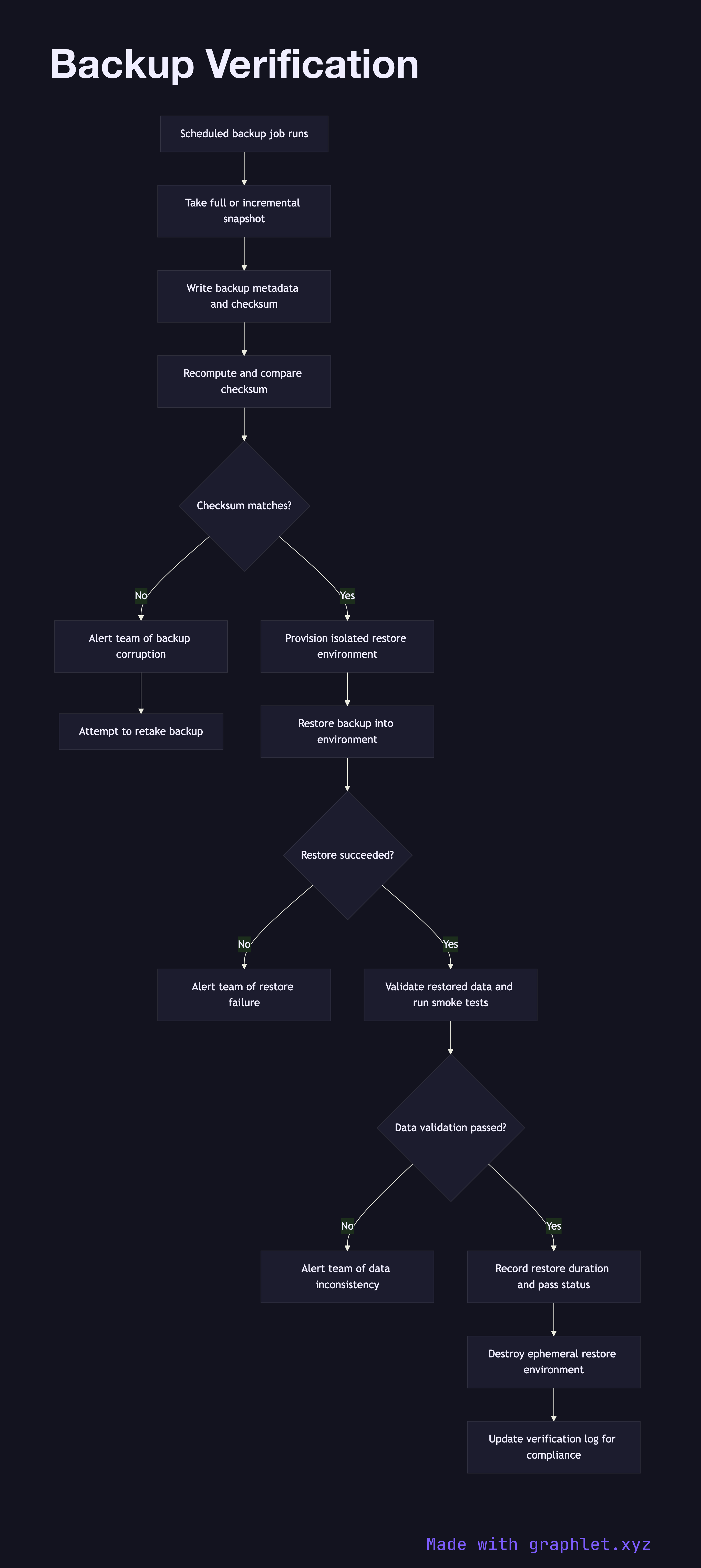
Backup verification is the automated process of confirming that backup snapshots are complete, uncorrupted, and actually restorable — because an untested backup is not a backup.
How verification works
Backups are taken on a scheduled basis — daily full snapshots, hourly incrementals, and transaction log backups for databases. Each backup job writes metadata alongside the snapshot: the timestamp, source system, size, and a checksum of the backup file. This metadata is the starting point for verification.
The first verification step is integrity checking: the checksum stored at backup time is recomputed against the backup file and compared. A mismatch indicates file corruption during storage or transmission and triggers an immediate alert. This check runs automatically after every backup job completes.
Integrity checking alone is insufficient — a structurally valid backup file may still fail to restore. The critical verification step is a restore test: the backup is restored into an isolated, ephemeral environment (a short-lived VM or container provisioned for the test, then destroyed). The restore test exercises the full recovery procedure, including decryption, decompression, and database startup.
After restoration, automated probes validate the restored data: record counts are compared against expected baselines, application smoke tests run against the restored instance, and for databases, consistency checks verify referential integrity. The result — pass or fail — along with the measured restore duration is recorded in a verification log.
Failed verifications are treated as incidents. The backup system attempts to take a new snapshot immediately, and the team is notified so the root cause (storage error, encryption key issue, schema change) can be investigated. Successful verifications are retained as evidence for compliance audits, demonstrating that RPO targets are achievable.