Secrets Rotation Workflow
A secrets rotation workflow is the automated process of replacing cryptographic keys, API tokens, database passwords, and other credentials before they expire or are compromised — without causing service downtime.
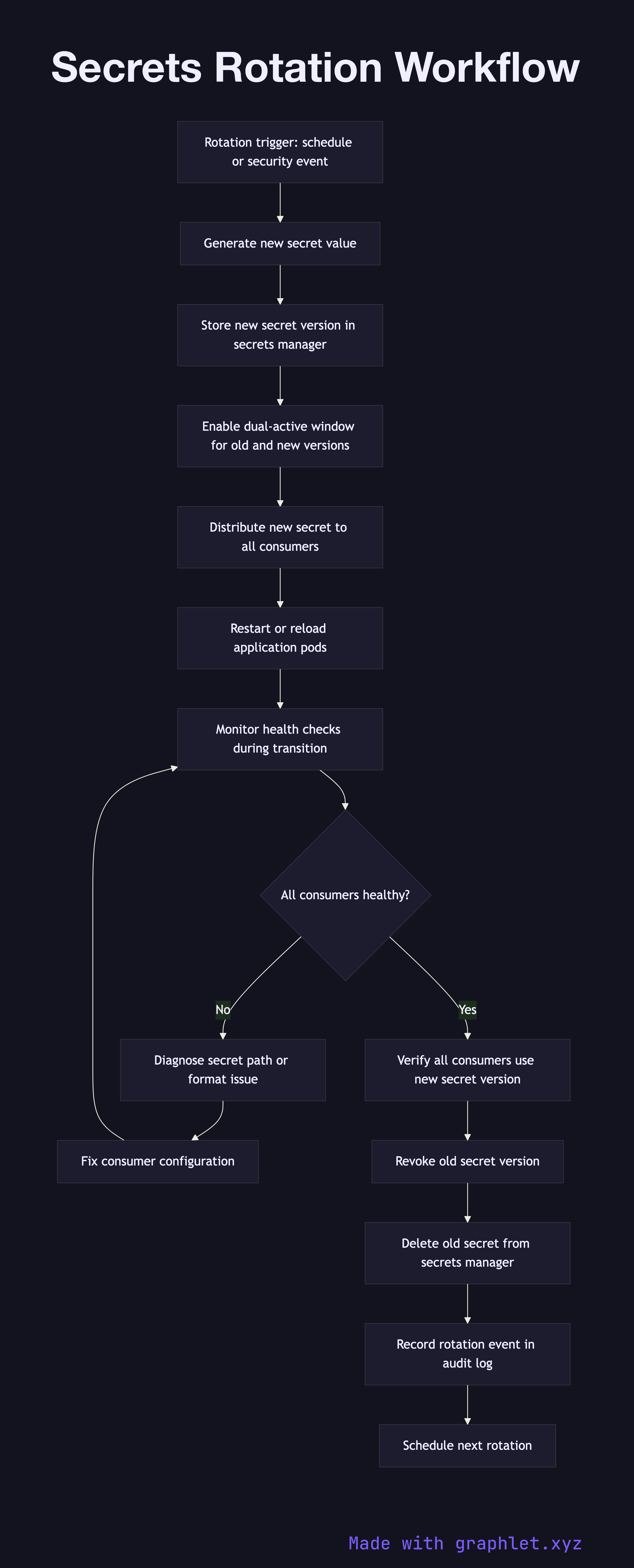
A secrets rotation workflow is the automated process of replacing cryptographic keys, API tokens, database passwords, and other credentials before they expire or are compromised — without causing service downtime.
How rotation works
Secrets rotation is triggered either on a schedule (e.g., rotate database passwords every 90 days) or by an event (suspected compromise, departing employee with access, security audit finding). Manual rotation is error-prone and causes outages; automated rotation is the reliable alternative.
The rotation process begins by generating a new secret value. For database passwords, this means issuing a new password to the database user. For API keys, it means calling the provider's API to generate a new credential pair. For TLS certificates, it means requesting a new certificate from the CA.
Before the old secret is deleted, the new secret must be distributed to all consumers without downtime. This is accomplished using a dual-active window: both the old and new secrets are valid simultaneously for a short overlap period. The secrets manager (HashiCorp Vault, AWS Secrets Manager, GCP Secret Manager) stores the new version while keeping the previous version accessible.
Applications are updated to load the new secret version. In Kubernetes, this typically involves restarting pods so they mount the updated secret from the secrets store. In serverless environments, functions reload secrets from the manager on each cold start. The rotation workflow monitors each application's health checks during the transition to detect any connection failures caused by misconfigured secret paths.
Once all consumers have confirmed they are using the new secret version, the old secret is revoked and deleted. The rotation event and its completion timestamp are logged in the audit trail for compliance purposes.