diagram.mmd — flowchart
Infrastructure Drift Detection flowchart diagram

Infrastructure drift detection is the automated process of comparing the actual state of cloud infrastructure against the desired state declared in Infrastructure as Code — identifying unauthorized changes, configuration mutations, and resource deletions before they cause incidents.
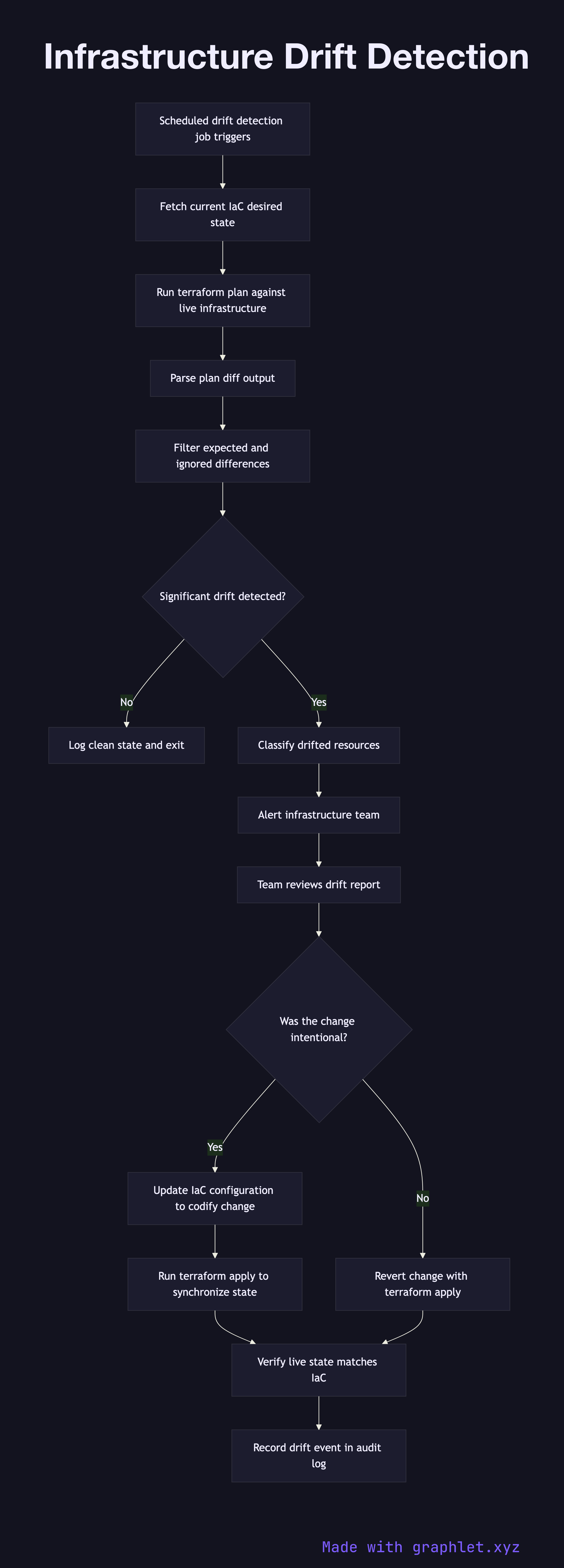
How drift detection works

Drift occurs when the real state of a resource diverges from what is declared in IaC configuration. This can happen through manual console changes (an engineer tweaks a security group rule), automated scaling adjustments that persist beyond their intended scope, or resource changes made by cloud provider maintenance operations.

A scheduled drift detection job runs terraform plan (or the equivalent IaC tool command) against the live infrastructure without applying any changes. The plan output is a diff: resources where the live state matches the declared state are reported as no-change; resources where they differ are reported as needing updates. Resources that exist in the real environment but not in the IaC configuration (orphaned resources) are flagged as unmanaged.

The diff output is parsed and evaluated for significance. Minor, expected differences (like auto-generated resource IDs) are filtered by ignore rules. Significant drift — a changed security group ingress rule, a modified IAM policy, a deleted monitoring alarm — triggers an alert to the infrastructure team.

The team reviews the drift report. If the change was intentional (perhaps an emergency hotfix was applied manually), the IaC configuration is updated to codify the change and a normal Infrastructure Provisioning run brings the IaC back in sync. If the change was unauthorized or accidental, it is reverted by running terraform apply to restore the declared state. All drift events are logged for compliance and security review.

Free online editor
Edit this diagram in Graphlet
Fork, modify, and export to SVG or PNG. No sign-up required.
Open in Graphlet →

Frequently asked questions

Infrastructure drift detection is the automated process of comparing the actual state of cloud infrastructure against the desired state declared in IaC configuration — identifying unauthorized changes, mutations, and resource deletions before they cause incidents or compliance violations.
A scheduled job runs `terraform plan` against live infrastructure without applying changes. The plan output is a diff: resources where the live state matches the declared state show no change; resources that diverged are flagged. The diff is parsed and significant changes trigger an alert to the infrastructure team.
Drift detection is read-only — it runs `terraform plan` purely to surface differences without modifying anything. An IaC apply is write — it runs `terraform apply` to bring the live environment back in line with the declared configuration. Drift detection informs the decision; apply executes the remediation.
The most common causes are manual console changes made during incidents (a security group rule added for debugging, never removed), cloud provider maintenance operations that modify resource attributes, and auto-scaling adjustments that persist beyond their intended scope.
Codify drift when the manual change was intentional and represents the correct desired state (e.g., a security rule added to resolve an incident that should become permanent). Revert drift when the change was unauthorised, accidental, or violates security policy. All decisions should be logged for compliance audit evidence.
mermaid
flowchart TD Schedule[Scheduled drift detection job triggers] --> FetchState[Fetch current IaC desired state] FetchState --> PlanRun[Run terraform plan against live infrastructure] PlanRun --> ParseDiff[Parse plan diff output] ParseDiff --> FilterIgnored[Filter expected and ignored differences] FilterIgnored --> DriftFound{Significant drift detected?} DriftFound -->|No| LogClean[Log clean state and exit] DriftFound -->|Yes| ClassifyDrift[Classify drifted resources] ClassifyDrift --> AlertTeam[Alert infrastructure team] AlertTeam --> ReviewDrift[Team reviews drift report] ReviewDrift --> DriftIntent{Was the change intentional?} DriftIntent -->|Yes| UpdateIaC[Update IaC configuration to codify change] UpdateIaC --> ApplySync[Run terraform apply to synchronize state] DriftIntent -->|No| RevertDrift[Revert change with terraform apply] ApplySync --> VerifyState[Verify live state matches IaC] RevertDrift --> VerifyState VerifyState --> AuditLog[Record drift event in audit log]
Copied to clipboard