Autocomplete Engine
An autocomplete engine completes a user's partially typed query in real time, surfacing the most likely completions before the user finishes typing — typically with latency under 50 milliseconds.
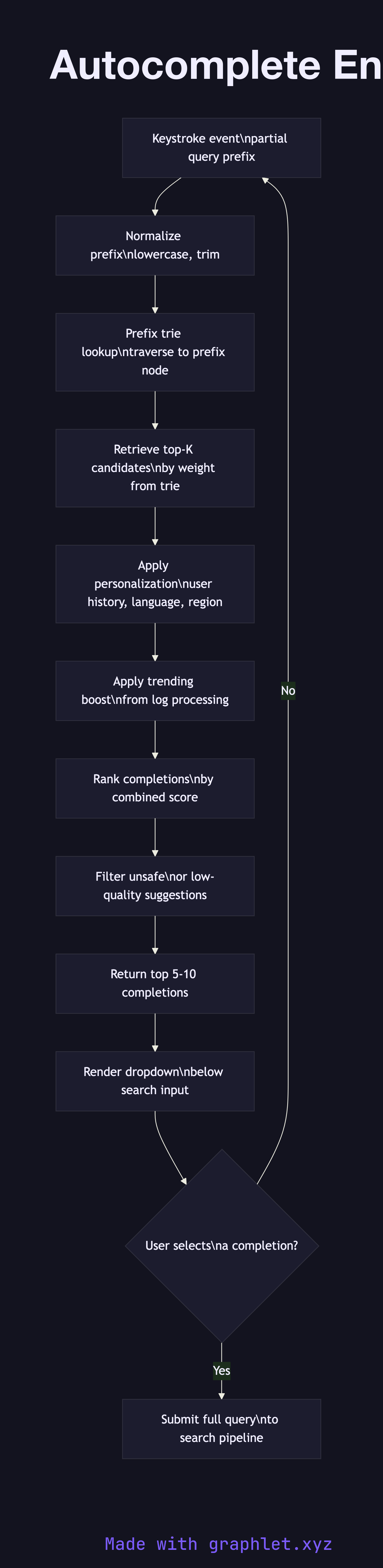
An autocomplete engine completes a user's partially typed query in real time, surfacing the most likely completions before the user finishes typing — typically with latency under 50 milliseconds.
How the autocomplete engine works
Prefix input arrives with every keystroke. A single character, a partial word, or a multi-token fragment is sent to the autocomplete service. The latency budget is strict: suggestions must appear faster than the user types or they feel laggy and unhelpful.
Prefix trie lookup is the core data structure operation. A trie (prefix tree) stores all indexed query completions as a tree of characters; each leaf or marked node represents a complete query string and carries an associated weight. Traversing from the root to the node matching the current prefix takes O(p) time, where p is the prefix length, regardless of the total vocabulary size.
Candidate retrieval collects all completions reachable from the prefix node. In a weighted trie or a top-K structure like a ternary search tree, only the highest-weight completions are returned to avoid scanning millions of leaves.
Personalization and context filtering re-ranks or filters the raw candidates using the current user's query history, location, language, and session context. A user who frequently searches for programming topics will see "python tutorial" ranked above "python snake" for the prefix "python".
Popularity and freshness signals come from the Search Log Processing pipeline, which aggregates click-through and search frequency data and feeds updated completion weights back into the trie periodically. Trending queries get a recency boost so that breaking news topics surface quickly.
Completion rendering returns the top 5–10 suggestions to the client, which renders them as a dropdown beneath the search input. Each suggestion is a clickable string that, when selected, submits the full query to the Search Query Processing pipeline. The Search Suggestion Engine extends this concept with entity-aware and semantic suggestions beyond simple query completions.