diagram.mmd — flowchart
Search Relevance Feedback flowchart diagram

Search relevance feedback is the closed-loop process that captures signals from user behavior and explicit judgments, feeds them back into ranking models, and continuously improves the quality of search results over time.
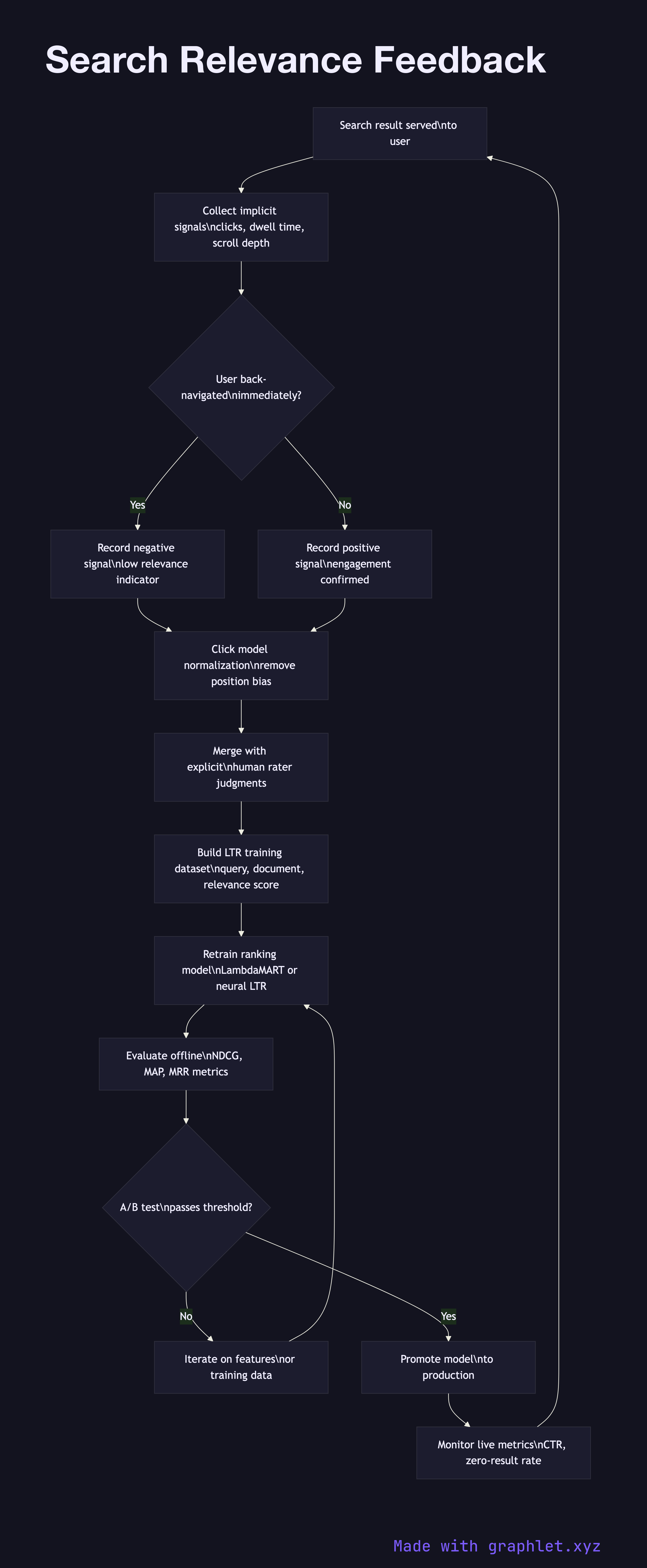
How relevance feedback works

Implicit signal collection captures behavioral events that proxy for relevance without requiring explicit user input: clicks on results, time spent on the clicked page (dwell time), scroll depth, back-navigation (a strong negative signal — the user returned immediately), and add-to-cart or conversion events in e-commerce search.

Explicit judgment collection gathers deliberate relevance labels from human raters or from users who rate results. Rater programs use a relevance scale (Perfect, Excellent, Good, Fair, Bad) applied to query-document pairs. These labels are expensive to produce but highly reliable, and they serve as the training signal for learning-to-rank models.

Click model normalization corrects for position bias — users click higher-ranked results more often regardless of their relevance, because they trust the ranker or simply because they see top results first. Models like UBM (User Browsing Model) or DBN (Dynamic Bayesian Network) de-bias raw click data to estimate true relevance.

Training data pipeline aggregates normalized implicit signals and explicit judgments into a dataset of (query, document, relevance_score) triples. This dataset is versioned, split into train and validation sets, and used to retrain the Ranking Algorithm Pipeline LTR model on a regular cadence.

Model evaluation and A/B testing measures the new model's performance on held-out validation data (NDCG, MAP, MRR) and then in a live experiment against the incumbent model, tracking click-through rate, session success rate, and zero-result rate.

Model promotion replaces the production ranker with the new model after it passes evaluation thresholds. Metrics are tracked by the Search Analytics Pipeline, and the cycle repeats.

Free online editor
Edit this diagram in Graphlet
Fork, modify, and export to SVG or PNG. No sign-up required.
Open in Graphlet →

Frequently asked questions

Search relevance feedback is the closed-loop process that captures signals from user behavior — clicks, dwell time, back-navigations — and from explicit human judgments, then uses those signals to retrain ranking models so that search result quality improves continuously over time.
Implicit behavioral events and explicit rater labels are aggregated into (query, document, relevance_score) triples. A click model such as UBM or DBN corrects for position bias in raw click data. The cleaned dataset is used to retrain the learning-to-rank model, which is then evaluated offline on held-out data and online in an A/B experiment before being promoted to production.
Implicit signals are cheap and plentiful but noisy — position bias and bot traffic contaminate them. Explicit judgments are expensive but reliable. The common approach is to use implicit signals for frequent query-document pairs where volume offsets noise, and explicit judgments to anchor model training and evaluate quality for head queries where errors are most visible.
The most frequent mistake is training a ranking model directly on raw click data without position-bias correction, which teaches the model to reproduce the existing rank order rather than to identify relevance. Other mistakes include evaluating only on offline NDCG without running an A/B test, and retraining too infrequently so the model drifts from current query patterns.
mermaid
flowchart TD SearchEvent[Search result served\nto user] --> ImplicitSignal[Collect implicit signals\nclicks, dwell time, scroll depth] ImplicitSignal --> BackNav{User back-navigated\nimmediately?} BackNav -->|Yes| NegSignal[Record negative signal\nlow relevance indicator] BackNav -->|No| PosSignal[Record positive signal\nengagement confirmed] NegSignal --> ClickModel[Click model normalization\nremove position bias] PosSignal --> ClickModel ClickModel --> ExplicitJudge[Merge with explicit\nhuman rater judgments] ExplicitJudge --> TrainingData[Build LTR training dataset\nquery, document, relevance score] TrainingData --> TrainModel[Retrain ranking model\nLambdaMART or neural LTR] TrainModel --> Offline[Evaluate offline\nNDCG, MAP, MRR metrics] Offline --> ABTest{A/B test\npasses threshold?} ABTest -->|No| Iterate[Iterate on features\nor training data] ABTest -->|Yes| Promote[Promote model\nto production] Promote --> Monitor[Monitor live metrics\nCTR, zero-result rate] Monitor --> SearchEvent Iterate --> TrainModel
Copied to clipboard