diagram.mmd — flowchart
RAG Architecture flowchart diagram

Retrieval-Augmented Generation (RAG) is an architectural pattern that grounds language model responses in external knowledge by retrieving relevant documents at inference time and injecting them into the prompt before generation.
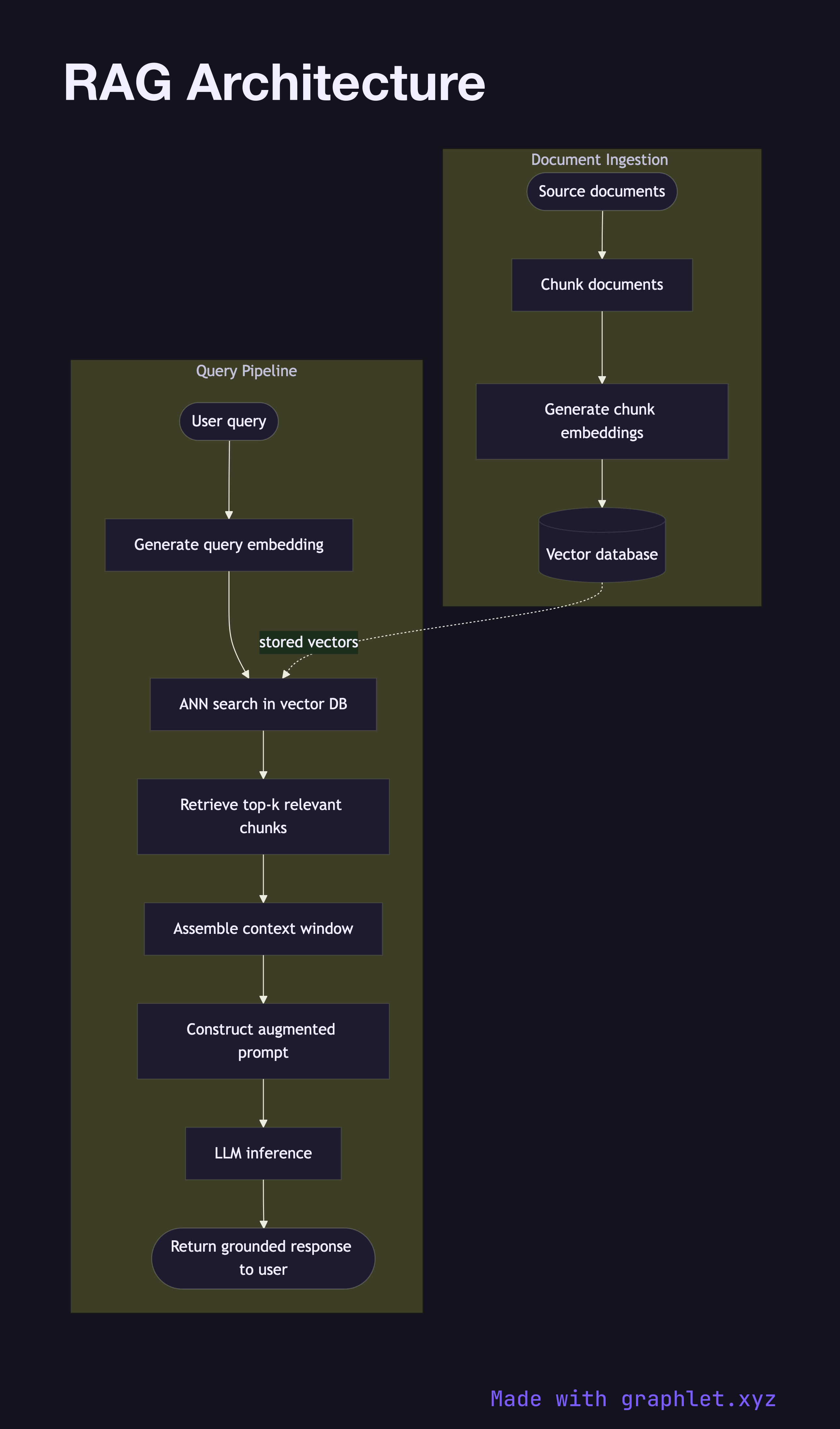
What the diagram shows

The diagram captures both the document ingestion pipeline (run offline or continuously) and the query pipeline (run on every user request):

Ingestion pipeline: 1. Source documents — web pages, PDFs, database exports, knowledge bases — enter the pipeline. 2. Documents are split into overlapping chunks small enough to fit within the embedding model's context window. 3. Each chunk is converted into a dense vector by an embedding model (see Embedding Generation Flow). 4. Vectors and their associated text payloads are written to a vector database (see Vector Database Query).

Query pipeline: 1. A user query arrives at the application. 2. The query is embedded using the same embedding model as the documents, producing a query vector. 3. The vector database returns the top-k most similar chunks via approximate nearest-neighbor search. 4. The retrieved chunks are assembled into a context window alongside the user's question. 5. An augmented prompt — system instructions + retrieved context + user query — is constructed and dispatched to the LLM (see LLM Request Flow). 6. The LLM generates a grounded response that cites information from the retrieved context.

Why this matters

RAG dramatically reduces hallucinations by giving the model accurate, up-to-date information at generation time, without requiring expensive fine-tuning. It also makes answers auditable — every claim can be traced back to a retrieved source chunk.

Free online editor
Edit this diagram in Graphlet
Fork, modify, and export to SVG or PNG. No sign-up required.
Open in Graphlet →

Frequently asked questions

RAG (Retrieval-Augmented Generation) architecture is a design pattern that augments a language model's generation by first retrieving relevant documents from an external knowledge base and injecting them into the prompt. It combines the fluency of LLMs with the factual grounding of a search system.
The ingestion pipeline converts source documents into vector embeddings and stores them in a vector database. At query time, the user's question is embedded with the same model, the vector database returns the most similar chunks, and those chunks are assembled into an augmented prompt that the LLM uses to generate a grounded response.
Use RAG when your knowledge base changes frequently, when you need answer provenance (citable sources), or when fine-tuning costs are prohibitive. Fine-tuning is preferable when you need to alter the model's style, format, or reasoning behavior rather than extend its factual knowledge.
Common mistakes include using different embedding models for documents and queries (causing retrieval failures), setting chunk sizes too large (diluting relevance signals), skipping metadata filters (returning off-topic results), and not re-ranking retrieved chunks before prompt assembly.
A traditional search system returns a list of matching documents for the user to read. RAG goes further by using the retrieved content as LLM context to synthesize a direct, natural-language answer — effectively combining retrieval and generation into a single response.
mermaid
flowchart TD subgraph Ingestion["Document Ingestion Pipeline"] Docs([Source documents]) --> Chunk[Chunk documents] Chunk --> EmbedDocs[Generate chunk embeddings] EmbedDocs --> VDB[(Vector database)] end subgraph Query["Query Pipeline"] User([User query]) --> EmbedQ[Generate query embedding] EmbedQ --> Search[ANN search in vector DB] VDB -.->|stored vectors| Search Search --> TopK[Retrieve top-k relevant chunks] TopK --> Context[Assemble context window] Context --> Prompt[Construct augmented prompt] Prompt --> LLM[LLM inference] LLM --> Response([Return grounded response to user]) end
Copied to clipboard