AI Chat Application Architecture
An AI chat application architecture is the full-stack system design for a conversational AI product — encompassing the client interface, session and memory management, prompt assembly, LLM integration, streaming delivery, and persistence layers.
An AI chat application architecture is the full-stack system design for a conversational AI product — encompassing the client interface, session and memory management, prompt assembly, LLM integration, streaming delivery, and persistence layers.
What the diagram shows
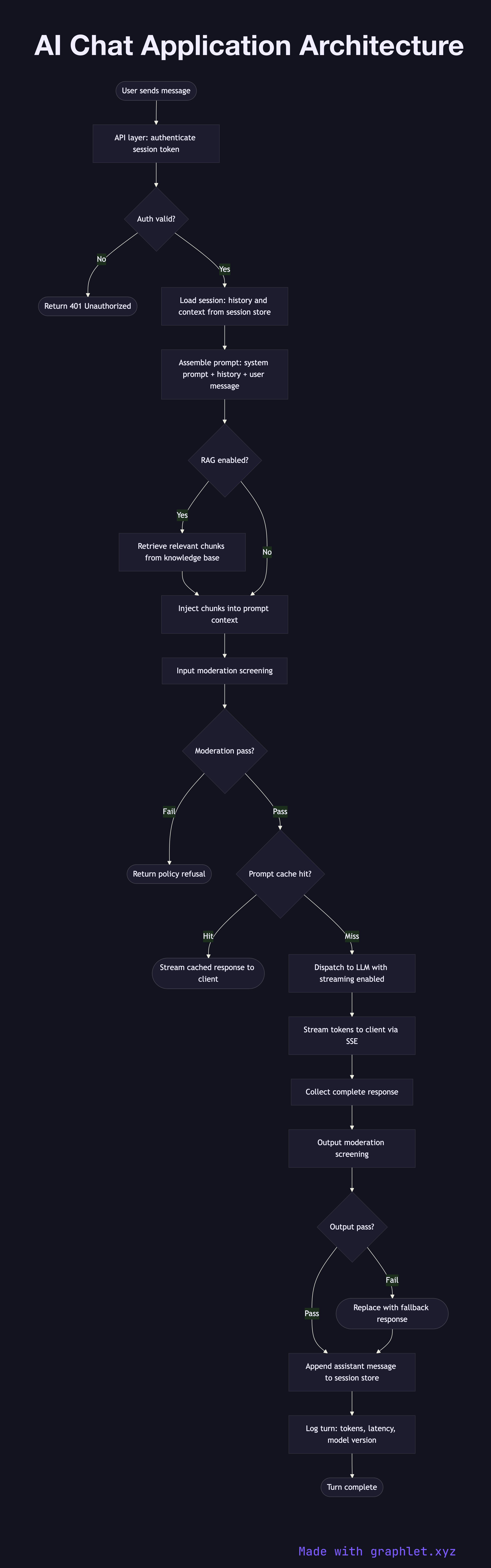
This flowchart maps the complete request-response cycle and data flows of a production AI chat application:
1. User sends message: the client (web app, mobile app, or API consumer) sends a new chat message. 2. Authentication: the API layer validates the user's session token and resolves their account, rate limits, and feature flags. 3. Session management: the conversation session is loaded from the session store, retrieving the full message history and any active context (document uploads, agent state). 4. Prompt assembly: the system prompt, conversation history, user message, and optionally retrieved context from a knowledge base are assembled into the final prompt (see Prompt Processing Pipeline). 5. Moderation — input: the assembled prompt is screened by the content moderation layer before dispatch (see AI Moderation Pipeline). 6. Prompt cache check: the prompt hash is checked against the cache. Cache hits return immediately (see Prompt Cache System). 7. LLM dispatch (streaming): the prompt is sent to the LLM with streaming enabled. Tokens are forwarded to the client via SSE as they arrive (see LLM Streaming Response). 8. Moderation — output: the completed response is screened before being finalized in the session. 9. Persist to session store: the assistant message is appended to the conversation history in the session store. 10. Analytics logging: the turn — input tokens, output tokens, latency, model version — is logged for observability and billing.
Why this matters
Each component in a chat application has distinct failure modes. Understanding the architecture as a whole helps engineers design resilient systems, add streaming without breaking session persistence, and integrate safety layers without sacrificing user experience. See AI Agent Workflow for how tool use extends this architecture into agentic territory.