Data Warehouse Pipeline
A data warehouse pipeline is the end-to-end system that moves data from operational sources into a structured, query-optimized store — a data warehouse — where analysts and BI tools can run complex aggregations across the full history of the business.
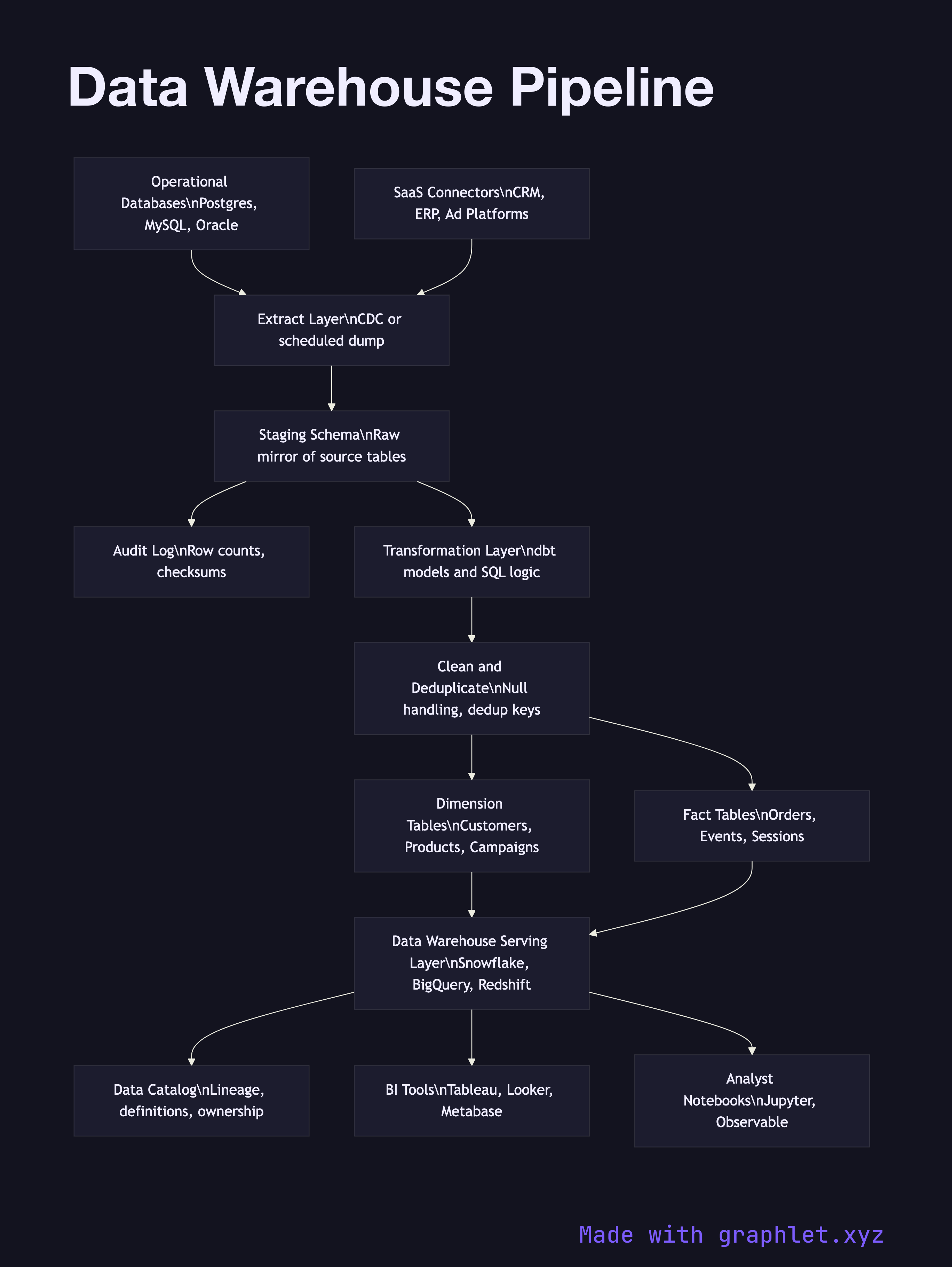
A data warehouse pipeline is the end-to-end system that moves data from operational sources into a structured, query-optimized store — a data warehouse — where analysts and BI tools can run complex aggregations across the full history of the business.
The fundamental purpose of a data warehouse is to separate analytical workloads from operational ones. Running a report that joins three years of orders against a customer table in the production database would degrade application performance for real users. The warehouse holds a curated, historical copy of that data, optimized for read-heavy analytical queries rather than the transactional writes of the source system.
The pipeline begins with source extraction. Operational databases export data through change data capture (CDC) or scheduled dumps. SaaS platforms expose their data through API-based connectors. All raw extracts land in a staging schema — a set of tables that mirror the source structure exactly, with no transformations applied. Staging acts as a landing zone and audit trail; if any downstream step fails, engineers can inspect exactly what arrived from the source.
From staging, a transformation layer built with a tool like dbt applies business logic to produce conformed dimension tables (customers, products, campaigns) and fact tables (orders, events, sessions). This is the heart of the ETL Workflow: data is cleaned, deduplicated, joined, and reshaped into a dimensional model (star or snowflake schema) optimized for analytical queries.
The conformed tables are loaded into the warehouse serving layer — Snowflake, BigQuery, Redshift, or a self-hosted columnar database — where query engines can scan billions of rows efficiently using partition pruning and columnar compression. A data catalog tracks table lineage and definitions so consumers know what each field means and where it came from. BI tools, notebooks, and the Analytics Dashboard Pipeline all query this layer directly.