Environment Promotion Flow
An environment promotion flow describes how a build artifact progresses through a series of increasingly production-like environments — typically development, staging, and production — with quality gates between each stage ensuring only validated releases advance.
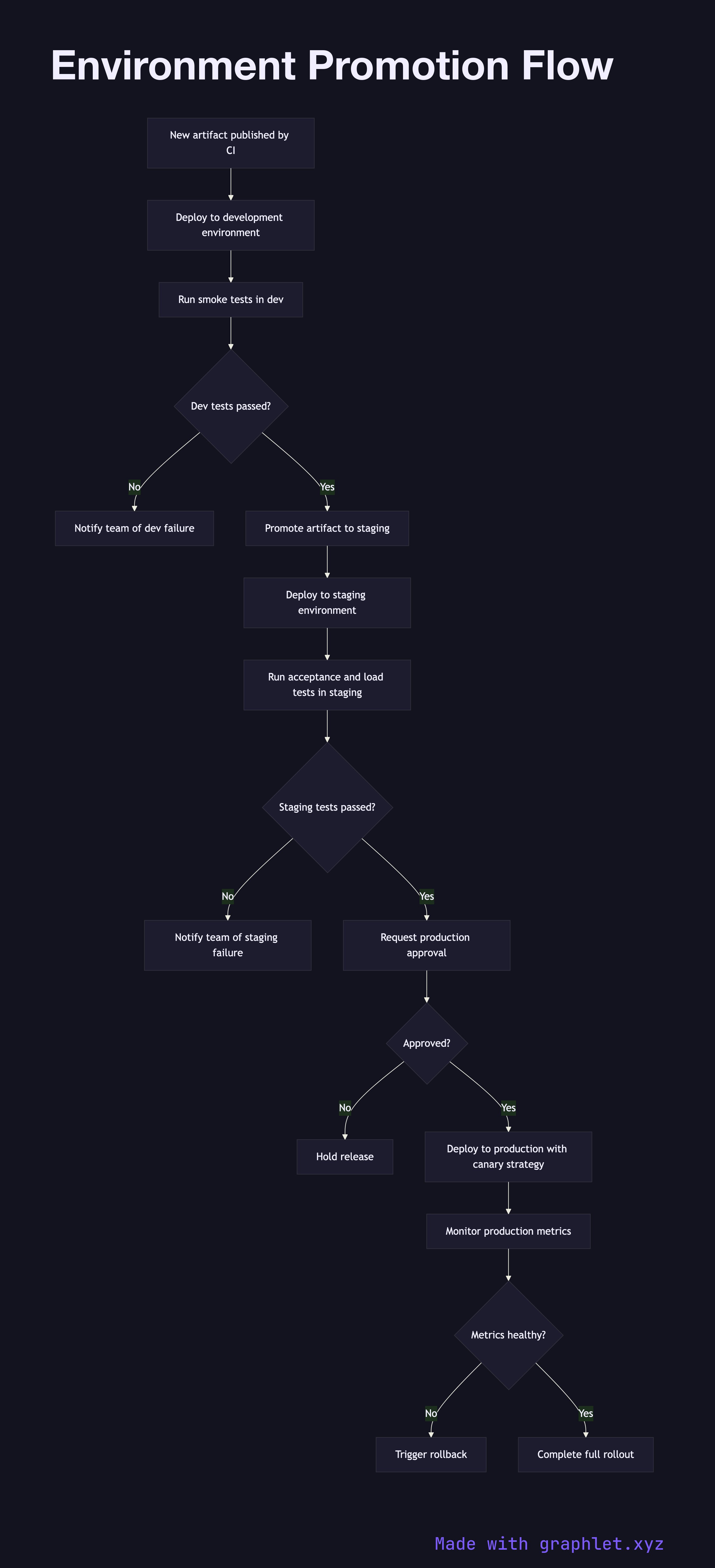
An environment promotion flow describes how a build artifact progresses through a series of increasingly production-like environments — typically development, staging, and production — with quality gates between each stage ensuring only validated releases advance.
How the flow works
Promotion starts when a CI Pipeline produces and publishes a new artifact. That artifact is the single immutable unit promoted all the way to production; it is never rebuilt between environments, only redeployed. This immutability guarantees that the artifact running in production is identical byte-for-byte to what passed testing in staging.
Development environment: The artifact is deployed automatically on every successful CI build. Automated smoke tests run to verify the application starts and responds. Developers use this environment for exploratory testing and integration verification with downstream services.
Staging environment: Promotion from dev to staging is typically automatic when dev tests pass, but some teams require a manual trigger or schedule. In staging, a comprehensive acceptance test suite runs — including load tests, contract tests, and end-to-end journeys. Staging mirrors production infrastructure as closely as possible to surface environment-specific issues before they reach users.
Production environment: Promotion from staging to production always passes through an approval gate (see Deployment Approval Flow). Once approved, the artifact is deployed using a progressive strategy — canary or blue/green — that limits the blast radius of any issues. Metrics are monitored during the rollout, and if thresholds are breached, the Rollback Deployment flow is triggered automatically.